
Alternatives
NovelCrafter alternatives for writers who want the manuscript back on their machine
Writers looking for a NovelCrafter alternative tend to name the same frictions: the novel lives in a browser tab, the AI runs on API keys you manage and pay for separately, and keeping the story consistent still comes down to how faithfully you tend the story bible. If that list sounds familiar, here is what to demand from whatever you move to.
Why writers go looking
A web app means your manuscript is somewhere, not here: fine until a deadline meets a hotel wifi login page. Bring-your-own-key AI means a second account, a second bill, and a model choice that quietly becomes your job. And a story bible, however well organized, is still a record you consult; as of August 2026, NovelCrafter’s site describes no feature that reads your finished chapters back and reports where they contradict each other with both passages quoted. When the timeline slips in chapter nineteen, the finding is still on you.
What to demand from a NovelCrafter alternative
A desktop app and files you own
The manuscript should be plain files in a folder you choose, editable with no account and no connection. Bunsho is a desktop app for macOS and Windows, and export to .docx, Markdown, and Fountain is always one click away.
AI without the key management
You should not need a developer account to check your own novel. Bunsho's AI is built in: sign in free for 10,000 starter credits, see the price of every action before it runs, and pay one bill.
A story bible that writes itself
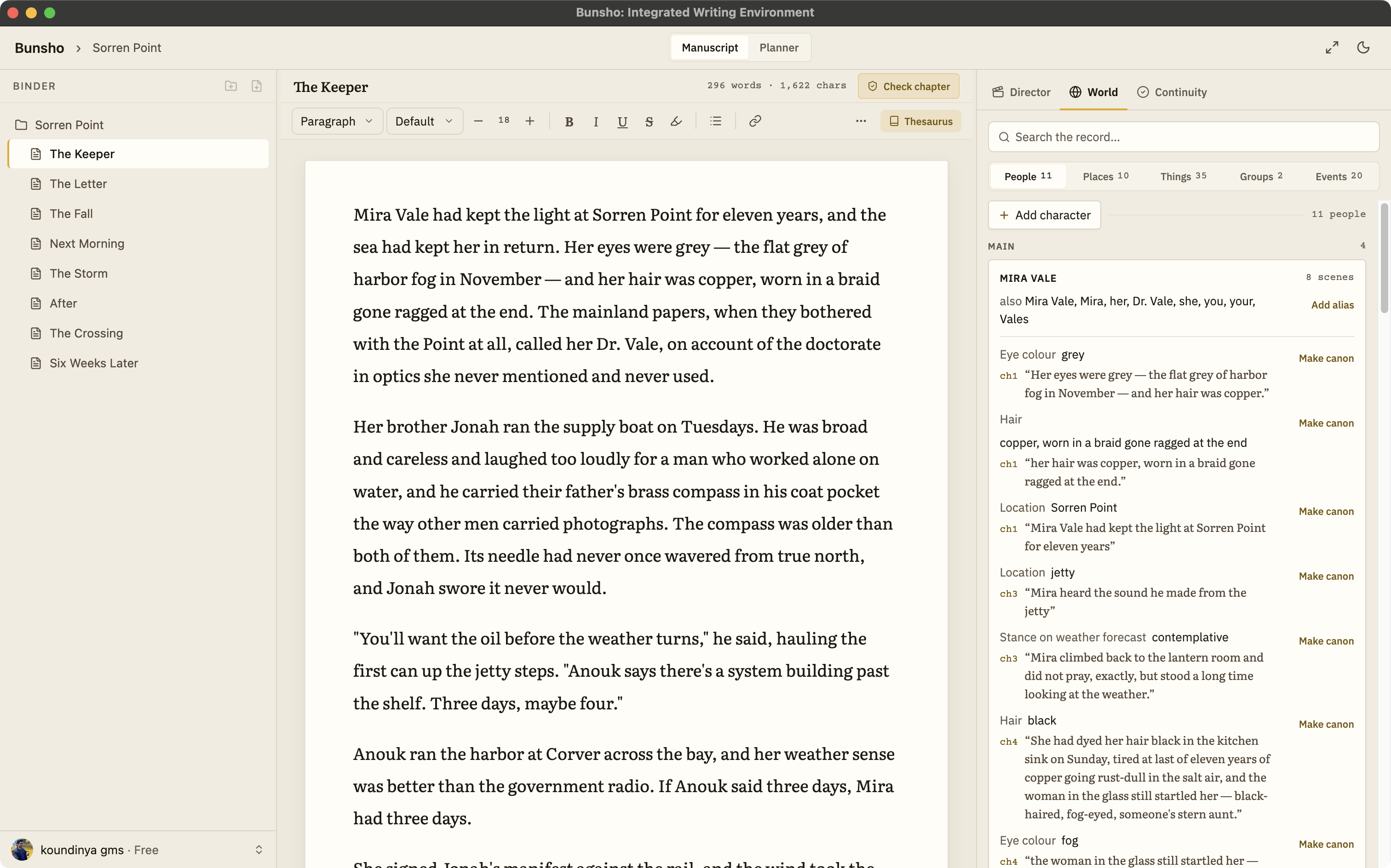
Bunsho's World tab fills itself from your prose, each entry tied to the sentence that established it, and accepts your own entries as canon. You curate it; you do not maintain it.
Checking that cites both passages
The bar to hold any tool to: ask where the manuscript contradicts itself and expect an answer that quotes the passage that established the fact and the passage that broke it. That is what a Bunsho finding looks like, every time.
Checking on your schedule, never on a meter you cannot see
In Bunsho nothing runs while you type. You check a chapter, review changed pages, or review the whole book when you choose, and writing itself is never metered.
Can I bring my work?
Yes. Export your manuscript from NovelCrafter as Word, Markdown, or plain text and import it into Bunsho, which accepts .docx, Markdown, .txt, and Fountain. The first import offers a full read of the book, cost shown before anything runs, and after it the World tab already knows your cast. Leaving later is just as simple: export to .docx, Markdown, or Fountain whenever you like, with EPUB on the roadmap.
Where Bunsho fits
Bunsho is for the writer who wants the record-keeping to work for them in both directions: a story bible that builds itself from the prose, and a continuity checker that holds new chapters to it on request. The manuscript stays local-first throughout: plain files and no account for the editor. Your manuscript lives on your machine, not on our servers. Pages are sent for analysis only when you run a check, and they’re never stored or used for training.
Common questions
Can I bring my NovelCrafter project into Bunsho?
Yes. Get your manuscript out as Word, Markdown, or plain text and import it into Bunsho, which accepts .docx, Markdown, .txt, and Fountain. Your chapters arrive as pages in the binder, and the first import offers a full read of the manuscript, with the cost shown first and a not-now option, so the World tab starts populated instead of empty.
Do I need my own OpenAI or Anthropic key for Bunsho?
No. NovelCrafter's AI features work by connecting an AI provider of your choice, as of August 2026. Bunsho ships with its AI built in: a free sign-in comes with 10,000 starter credits, every AI action shows its price before it runs, and there is one bill, not a subscription plus a per-token invoice somewhere else.
Does Bunsho have something like the Codex?
The World tab plays that role, with one difference in kind: it fills itself from your prose. Characters, places, objects, and relationships are filled in from your chapters, each entry tied to the sentence that established it, and you can add your own entries as canon. It is the same record the continuity checker checks your chapters against.
How does pricing compare?
NovelCrafter advertises plans from $4 a month with a 21-day free trial as of August 2026, with AI usage billed through the provider you connect; see novelcrafter.com for current details. Bunsho's editor is free for macOS and Windows with no account. Free is $0 with one project, Quill is $8 with no AI, Storyteller is $15 with the continuity checker and a monthly allowance, and Saga is $29 with a higher limit. Writing is never metered.
Does Bunsho work offline?
The editor does. Bunsho is a desktop app and your chapters are plain files on your machine, so writing and organizing need no connection and no account. The World and Planner tabs come with a free sign-in. Your manuscript lives on your machine, not on our servers. Pages are sent for analysis only when you run a check, and they're never stored or used for training.
One app, one bill, and the manuscript on your machine.
Bunsho is free to download for macOS and Windows. The editor needs no account.