
Screenwriting software
Screenwriting software: what it is, what to look for, and where Bunsho fits
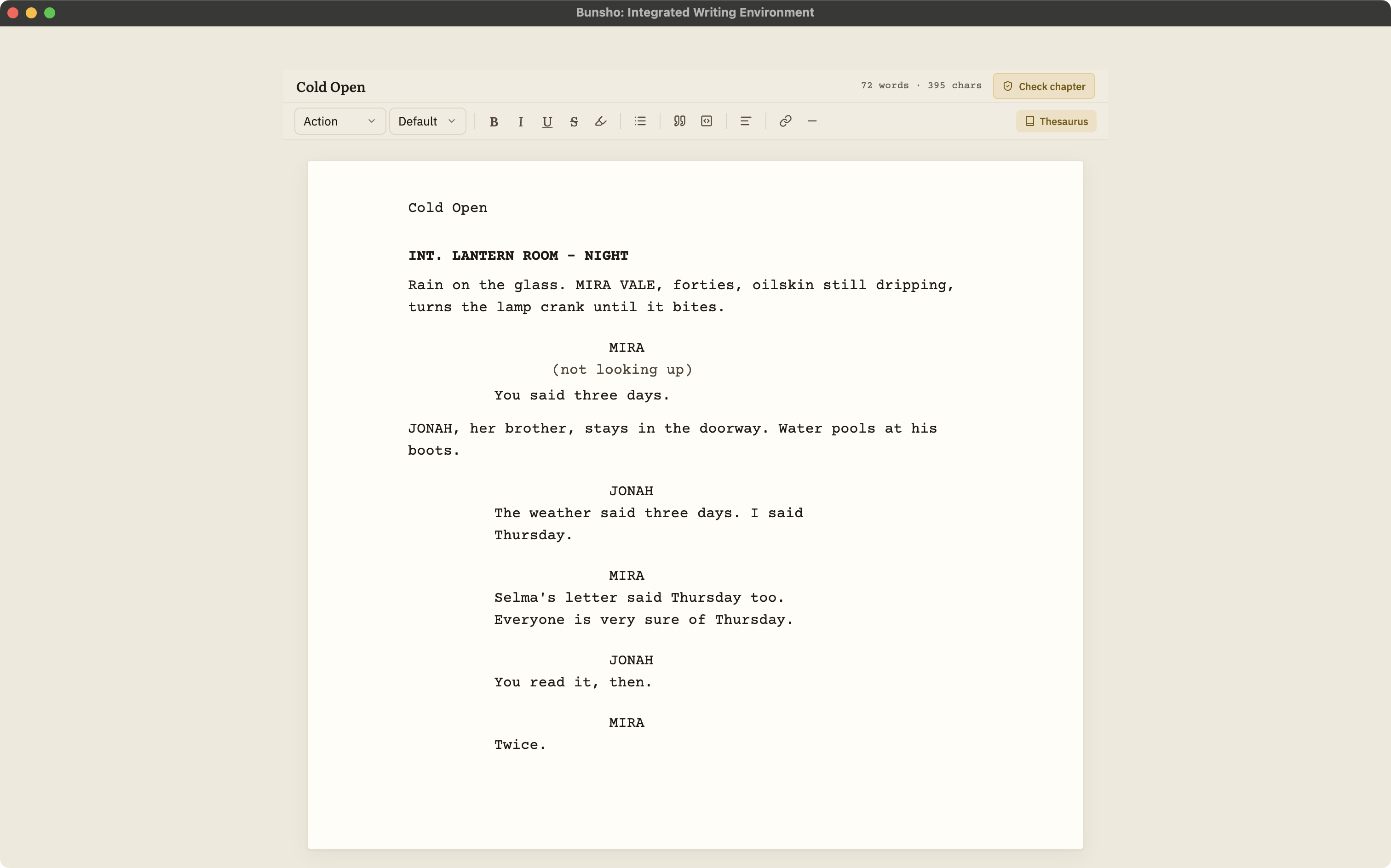
Screenwriting software is a writing app that formats a script to industry standard as you type: sluglines, action, character cues, dialogue, parentheticals and transitions land in the right place on the page without you touching a margin. The good ones also handle the files the industry exchanges (PDF, Final Draft's .fdx, and plain-text Fountain), and some add collaboration, revisions and production tools. Bunsho is screenwriting software with a different centre of gravity: a free, local-first script editor with Fountain in and out, plus a continuity checker that reads your script scene by scene when you ask.
What screenwriting software is
A screenplay has a strict shape. Scene headings, or sluglines, tell a production where and when a scene happens. Action lines describe what we see. Character cues sit above dialogue, parentheticals qualify a line, and transitions mark the cut. The layout is not decoration: a page of correctly formatted script runs roughly a minute of screen time, so readers, producers and schedulers all lean on it. Screenwriting software exists so that you never think about any of that while you write. Press Enter after a character name and you are in dialogue; press Tab and you are back in action.
Everything past formatting is where the category splits. Some apps are built around the production pipeline, with revision colors, locked pages, reports and breakdowns. Some are built around collaboration in the browser. Some are built around plain text, so a script is a file any editor can open. And a few, Bunsho among them, are built around the story itself: keeping the facts of a script straight across a hundred-odd pages and many drafts.
What to look for
Feature lists run long. These are the questions that actually separate one screenwriting app from another, in roughly the order they bite.
Formatting that stays out of your way
Every serious app handles the six standard elements. The difference is feel: how Tab and Enter move between elements, whether character names and locations autocomplete, and whether the app guesses right when you type INT. at the start of a line.
File formats: PDF, FDX, Fountain
PDF is what you send to readers, contests and agents. Final Draft's .fdx is what productions and many collaborators exchange. Fountain is a plain-text screenplay format that almost every modern app can read, which makes it the easiest way to move a script between tools and keep it readable forever.
Collaboration
If you co-write, real-time editing and comments matter more than anything else on this list. If you write alone, they matter not at all, and a local app is usually simpler.
Revisions and production tools
Once a script is in production, revision colors, locked pages, scene numbers and reports become the job. Before that point, most writers never touch them.
Continuity
A script contradicts itself the same ways a novel does: a prop that is in two places, a character who knows something before she learns it, a wound on the wrong hand. Most screenwriting apps leave this to you, your notes and a careful read. Bunsho checks for it when you ask.
Price and how you pay
The field runs from free and open source to one-time licences to monthly subscriptions. Check what the free tier actually allows (script count, watermarks, export formats) before you commit a draft to it.
File ownership
Ask where the script lives. A desktop app that writes plain files to your disk is the most portable answer; a browser app keeps your script on its servers and makes export the only way out.
The jobs, and which kind of tool does each
No single tool does every job well. This is how the jobs map onto the kinds of software writers actually use. Named apps are examples, not an exhaustive list; the roundup has the details.
| Typical tools | What to check | |
|---|---|---|
| Drafting in standard format | Every screenwriting app, including Bunsho, Final Draft, Fade In, Highland, WriterDuet | How the keyboard flow feels to you; try the free tier or trial for a few scenes |
| Submission PDF | Final Draft, Fade In, Highland, WriterDuet, Arc Studio, most others. Not Bunsho | Clean pagination and a title page that matches what readers expect |
| Exchanging .fdx with a production | Final Draft natively; Fade In, Highland, WriterDuet, Arc Studio and Beat also read and write it. Not Bunsho | Round-trip fidelity of scene numbers, revisions and notes |
| Co-writing in real time | WriterDuet, Arc Studio, Celtx, Final Draft (between Final Draft 13 users), Fade In with its online add-on | Whether both writers need a paid seat |
| Plain-text writing in Fountain | Highland, Beat, Bunsho, Fade In, Starc, and any text editor | Which Fountain features survive import (dual dialogue, notes, sections) |
| Checking story continuity | Bunsho; elsewhere, notes and a careful read | Whether findings cite the passages that disagree, and what a check costs |
Where Bunsho fits
Bunsho started as a manuscript editor for novelists and grew a screenplay mode for writers who work in both, or who simply want the same continuity check for scripts. Here is what it does for a screenwriter today, all of it shipping.
A screenplay editor that formats as you type
Create a screenplay project and the editor works in the six standard elements: slugline, action, character, parenthetical, dialogue and transition. An element picker, ghost hints that show what each line expects, Tab and Enter cycling, and autocomplete for sluglines and character names keep your hands on the keys.
Fountain in, Fountain out
Import a .fountain script and it opens as a project, split into pages you can reorder and edit. Export back to .fountain, with a title page, whenever you want to move to another app. Importing and exporting are never metered on any plan.
Continuity checking that reads a script as a script
When you ask, Bunsho checks your script scene by scene against everything it has established: sluglines and scene order, who is in each scene, props and wardrobe, and what a character can know at each point. Every finding cites both passages, the one that set the fact and the one that broke it.
Deliberate, priced per scene, cost shown first
Nothing runs on save or in the background. You press a button, the confirm dialog shows the price for the scenes involved, and only your click spends anything. Screenplay checks are live on the Storyteller ($15 a month) and Saga ($29 a month) plans.
Free, local-first, no account
The editor is a free download for macOS and Windows and needs no account. Your manuscript lives on your machine, not on our servers. Pages are sent for analysis only when you run a check, and they're never stored or used for training.
Where Bunsho does not fit, yet
Being clear about the gaps is more useful than a long feature list. As of October 2026, Bunsho does not do the following, and if you need them, a dedicated formatter is the right tool alongside it.
No PDF export of a script
Bunsho does not produce a submission PDF. Export to Fountain and open it in Highland, Fade In, WriterDuet, Beat or another Fountain-aware app to produce the PDF.
No Final Draft .fdx import or export
Bunsho reads and writes Fountain only. If a production sends you an .fdx, convert it to Fountain in an app that reads both (Fade In, Highland, WriterDuet and Beat all do), and convert back the same way. Final Draft itself does not open .fountain files; its help center suggests importing the script as plain text.
No real-time collaboration
Bunsho is a single-writer desktop app. Co-writing partners who need to type in the same script at once are better served by a collaborative tool.
No revision colors, locked pages or production reports
Revision sets, scene numbering for production, breakdowns and scheduling are not part of Bunsho. Those belong in the production tools that already do them well.
Some Fountain extras do not survive import
Dual dialogue arrives as two sequential speeches, and notes, sections, synopses, centered text and lyrics come in as plain action or are dropped, with a warning listing what changed.
Put plainly: write and check in Bunsho, export Fountain, and produce the PDF or .fdx in Highland, Fade In, WriterDuet or whichever formatter you already trust. Final Draft users can bring the script in as a plain-text import. Best screenwriting software in 2026 compares the formatters side by side.
A workflow that uses each tool for what it is good at
Draft in Bunsho, or import what you have
Start a screenplay project, or bring an existing draft in as .fountain. Most apps that do not open Fountain natively can export it.
Check the script when a draft is ready
Run a check on the pages you changed or on the whole script. Each finding quotes both passages, so ruling on it takes seconds, and you decide whether it is a slip or a choice.
Export Fountain and format for delivery
Export to .fountain and open it in your formatter of choice for the PDF, the .fdx, revision colors and anything production needs.
Bring revisions back the same way
When notes come in, export Fountain from your formatter, import it into Bunsho, and check the new draft against the story it is meant to tell.
By platform and budget
What each free tier allows, from open-source apps with no limits to browser plans with a script cap, and the catch in each.
The Mac has the widest choice, from Mac-only Fountain apps to the industry standard. How they compare.
Highland and Beat are Mac-only. What Windows screenwriters use instead, and where Bunsho fits.
Final Draft, Fade In, Highland, WriterDuet, Celtx, Arc Studio, the free and open-source options, and Bunsho, compared honestly by what each is best for.
What writers look for when they leave Final Draft, and where each alternative is strongest.
The industry-standard formatter and a continuity checker for scripts, side by side, and how to use both.
Two Fountain-first apps with different jobs: Highland formats and exports, Bunsho checks the story.
Screenplay continuity checking in detail: what it reads, what a finding looks like, what it costs.
Common questions
What is screenwriting software?
A writing app that formats a script to industry standard as you type: sluglines, action, character cues, dialogue, parentheticals and transitions land in the right place on the page automatically. Most also export PDF and exchange files in Final Draft (.fdx) or Fountain format, and some add collaboration, revision tracking and production tools.
What is the industry-standard screenwriting software?
Final Draft is the long-standing industry standard, and its .fdx file is what many productions exchange. That does not mean you have to write in it: most professional apps import and export .fdx, and a PDF is what readers, contests and agents actually receive.
Is Bunsho screenwriting software?
Yes. Bunsho has a screenplay project mode with the six standard elements, an element picker, ghost hints, and slugline and character-name autocomplete, plus Fountain import and export. What sets it apart is continuity checking: when you ask, it checks your script scene by scene and cites both passages for every contradiction it finds.
Can Bunsho export a PDF or a Final Draft file?
No, not as of October 2026. Bunsho exports Fountain. To get a submission PDF or an .fdx, open the exported .fountain file in a formatter such as Highland, Fade In, WriterDuet or Beat and export from there. Final Draft does not open .fountain directly, but its help center describes importing a Fountain script as plain text. Writing and checking happen in Bunsho; formatting for delivery happens in the tool you already trust.
What is Fountain and why does it matter?
Fountain is a plain-text screenplay format: you type a script in ordinary text with a few conventions, and any Fountain-aware app renders it as a formatted screenplay. Because it is just text, a Fountain script opens anywhere, diffs cleanly, and never gets stuck in one company's file format. Bunsho imports and exports it on every plan.
Is Bunsho free for screenwriters?
The editor is free to download for macOS and Windows with no account, and the Free plan includes one project. Quill at $8 a month adds unlimited projects without AI. Screenplay continuity checks are live on Storyteller ($15 a month) and Saga ($29 a month), priced per scene with the cost shown before every check. Writing is never metered.
Does Bunsho check my script while I type?
No. Checking is deliberate: you ask for a check, the confirm dialog shows the per-scene price, and nothing runs until you click. Nothing runs on save or in the background, so drafting stays quiet and costs nothing.
What does screenplay continuity checking catch?
Contradictions a script supervisor would flag: a prop or costume that changes between scenes without a reason, a character who appears somewhere she cannot be, a character who knows something before the scene where he learns it, and scene order or time-of-day slips. Each finding quotes both passages so you can decide in seconds whether it is a slip or a choice.
Can I co-write a script in Bunsho?
Not in real time. Bunsho is a single-writer desktop app with no live collaboration. Writing partners who need to type in the same script at once should use a collaborative tool, and either partner can still export Fountain and run a continuity check in Bunsho before a draft goes out.
Where does my script live?
On your machine, as plain files in a folder you choose, on macOS and Windows. Your manuscript lives on your machine, not on our servers. Pages are sent for analysis only when you run a check, and they're never stored or used for training.
Write the script. Check the story. Keep the file.
Bunsho is free to download for macOS and Windows with no account. Fountain in and out; screenplay checks are live on Storyteller and Saga, priced per scene, cost shown first.