
Novel writing software
Novel writing software: what it is, what to look for, and where Bunsho fits
Novel writing software is an app built for the length and shape of a book: chapters you can reorder, a quiet page to draft on, notes about your characters and world, word count goals, and clean import and export. Bunsho is free novel writing software for macOS and Windows that does all of that, and adds the one thing most tools leave to you: when you ask, it checks your chapters for continuity errors and shows you both passages.
What novel writing software is
A word processor is built for documents: a letter, a report, a chapter. A novel is something else. It runs to eighty or a hundred thousand words, gets written over months or years, and has to stay true to itself across all of them. Novel writing software exists for that shape. At minimum it gives you a way to see and rearrange the whole book, a page that does not get in the way, and somewhere to keep what you know about your story. The better tools add planning, goals, and formats that let your manuscript move in and out without retyping.
The category is broader than one kind of app, and most novelists end up using two or three. It helps to know which kind you are looking at:
Drafting environments
Where the words get written: a binder, a page, notes alongside. Scrivener, Dabble, Bunsho and Reedsy Studio live here. This is the core of the category and the tool most novelists mean by novel writing software.
Outliners and planners
Timelines, plotlines and index cards for the shape of the book before or during the draft. Plottr is the specialist; many drafting tools, Bunsho's Planner included, carry a lighter version.
Worldbuilding tools
Structured records of characters, places, magic systems and cultures. Campfire goes deepest. Most of these hold what you type in rather than reading the manuscript.
AI drafting tools
Software that generates or rewrites prose from your notes, such as Sudowrite. Useful for speed, and a different philosophy from tools that leave every sentence to you.
Editing and formatting tools
Style and grammar editors such as ProWritingAid, and layout tools such as Atticus that turn a finished manuscript into an EPUB and a print PDF. They sit at the end of the process, next to whatever you drafted in.
What to look for, and how Bunsho does each
Whatever tool you choose, these are the questions worth asking. The right-hand column is how Bunsho answers them; the 2026 roundup answers them for nine other tools.
| Look for | Why it matters | In Bunsho |
|---|---|---|
| Structure for a whole book | A novel is dozens of chapters you will reorder, split and merge. One long document fights you. | A binder of chapters and scenes in manuscript order, always in view beside the page. |
| Distraction-free drafting | Most words get written in short, fragile sessions. The tool should disappear. | A clean page in paper or dark theme, and a focus mode that hides everything else. |
| A story bible | Eye colors, ages, who knows the secret. You need one place to look things up. | The World tab fills itself from your prose, each entry tied to the sentence that set it. Your own entries count as canon. |
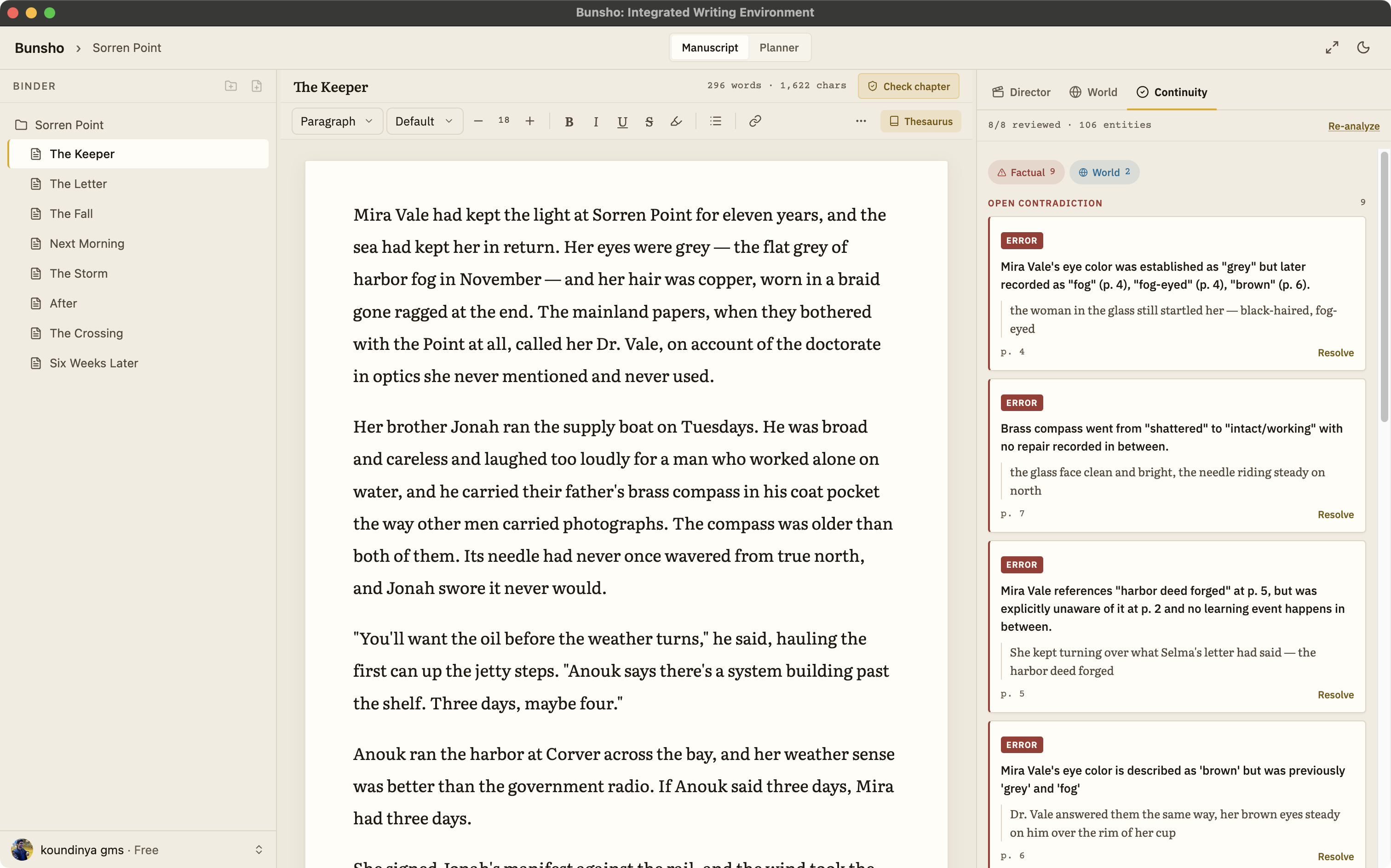
| Continuity checking | A bible only helps if you remember to look. Contradictions hide in chapters you wrote months apart. | Ask for a check on a chapter, on changed pages or on the whole book. Each finding cites both passages. |
| Planning | Plotters need to see the shape; discovery writers need to see what they actually wrote. | The Planner: chapter cards with what each chapter is meant to do, in Grid or Tracks views. |
| Goals | A book is finished one day's words at a time. | A daily goal, a streak across all your books, and a finish date with its pace, on every plan. |
| Import and export | Your draft arrives from somewhere and leaves as a Word file for editors and agents. | Import .docx, Markdown, .txt and Fountain. Export .docx, Markdown and Fountain on every plan. |
| File ownership | Years of work should not depend on one company's servers. | Chapters are plain files in a folder you choose, on your machine. No cloud copy. |
| AI stance | Some writers want AI drafting, some want none. You should know exactly what it does and when. | AI runs only when you press a button, with the cost shown first. It never writes while you type. Quill has no AI. |
The part most tools leave to you: continuity
Every serious novelist keeps some kind of story bible, in a notebook, a spreadsheet or a tool. The trouble is that a bible only holds what you remembered to write down, and it never reads the manuscript. So the scar moves from the left hand to the right, a character quotes a letter she never received, and a three-day journey takes a week the second time. Readers notice. Editors notice. You usually notice last.
Bunsho was built around that gap. The World tab fills itself with your characters, places and objects from your chapters, and when you ask for a check, Check this chapter, Review changes or Run full review on the whole book, your chapters are read against what the story has established. Each finding quotes both passages side by side: the sentence that set the fact and the sentence that broke it. Some contradictions are deliberate, an unreliable narrator or a character lying, so every finding is a question, not a verdict: slip or deliberate, you decide. Checks run only when you ask, with the cost shown first, and writing itself is never metered. See a finding on the continuity checker page.
Choosing by the way you write
Plotters
You want to see the book before you write it. Look for a planner or outliner you will actually keep open. Bunsho's Planner holds chapter cards beside the draft; Plottr is the specialist if timelines are how you think.
Discovery writers
You find the story by writing it, which means facts get established mid-sentence and forgotten by chapter twenty. A story bible that fills itself from your prose, and a check when the draft is done, suit this way of working.
Fantasy, science fiction and series writers
Invented names, rules of magic, a large cast. Look for a custom dictionary, somewhere to state the rules once, and a way to catch the chapter that breaks one. Bunsho keeps each book straight today; shared canon across a series is on its roadmap.
Self-publishers on a release schedule
Speed and a clean .docx out. Writing in Bunsho is never metered, checks cost what they cost and say so first, and export is free on every plan. For final layout, pair any drafting tool with Atticus, Vellum or Reedsy Studio.
Writers who care where the book lives
Prefer a desktop app that keeps chapters as files on your machine. Bunsho, Scrivener and Plottr all do; browser tools keep your book in their cloud.
When another tool is the better choice
Bunsho is not the right tool for everyone, and pretending otherwise would waste your time. If you want to write on your phone or iPad, or co-write live with a partner, Dabble does that today and Bunsho does not. If you want AI to generate prose from your outline, Sudowrite is built for it. If you rely on a deep compile step to produce formatted manuscripts and ebooks, Scrivener and Atticus are stronger. If you build worlds with maps, languages and religions before you write a word, Campfire has more structure. And if you need shared canon across the books of a series in one place, that is on Bunsho's roadmap, not in the app yet.
Where Bunsho is the better choice: a long book, a big cast, details you cannot afford to get wrong, and a wish to keep the book on your own machine and every sentence your own. The Scrivener, Dabble, NovelCrafter and Sudowrite comparisons go deeper, one tool at a time.
Pricing, in one paragraph
The Bunsho editor is free to download with no account, and the free plan keeps one project with goals and export. A free sign-in adds the World tab, the Planner and 10,000 starter credits to try the continuity checker. Quill is $8 a month for unlimited projects with no AI. Storyteller is $15 a month with the continuity checker and enough each month to read a full novel and check about 90 chapters after that. Saga is $29 a month for about 250 chapter checks a month. Writing is never metered on any plan. Exactly what is free is on the free novel writing software page.
By platform and need
Common questions
What is novel writing software?
Novel writing software is an app built for the length and shape of a book rather than a single document. It keeps chapters and scenes in an outline you can reorder, gives you a quiet page to draft on, holds notes about characters and places, tracks word count goals, and imports and exports manuscripts in standard formats such as .docx.
Is Microsoft Word or Google Docs enough to write a novel?
Many novels have been written in Word, and it remains the format editors and agents expect. What a word processor lacks is structure for a long book: a binder of chapters you can reorder, notes that sit beside the draft, and anything that reads the book back for contradictions. Most novelists who switch keep Word for submission and use novel writing software for drafting.
What is the best free novel writing software?
It depends on what you need free. Bunsho's editor is free on macOS and Windows with no account, including one project with goals and export; the World and Planner tabs come with a free sign-in. Reedsy Studio is free in the browser and formats EPUB and print PDFs. Manuskript is free and open source. Our free novel writing software page compares them honestly.
Does Bunsho write my novel for me?
No. Bunsho never writes while you type and never rewrites your manuscript on its own. Its main AI feature checks your chapters for contradictions when you ask. Director Mode can draft a scene, but only one you direct, as a beat sheet you approve first, and only if you choose to keep it. The Quill plan has no AI at all.
Does novel writing software work offline?
Desktop apps such as Scrivener and Bunsho keep your manuscript on your computer, so drafting needs no connection. Browser-based tools usually need one, though some offer an offline mode. In Bunsho, writing, organizing, the World and Planner tabs and export work offline; only the AI actions you ask for, such as a chapter check, need the internet.
Can novel writing software find plot holes and continuity errors?
Most cannot. Outliners and story bibles hold what you type into them but never compare it with your chapters. Bunsho is built for this: when you ask for a check, it reads your chapters against what the story has established and shows both passages when they disagree, such as an eye color that changes or a character who knows something she has not learned yet. You decide whether each one is a slip or deliberate.
Which novel writing software do professional authors use?
There is no single standard. Scrivener has been the long-time default for many authors, Word remains the submission format, and writers mix in tools for outlining, worldbuilding, formatting and editing. Pick the tool that fits how you draft, and make sure it exports a clean .docx so the rest of publishing works as normal.
Can I move my manuscript into Bunsho from Scrivener or Word?
Yes. Bunsho imports Word (.docx), Markdown, plain text and Fountain. A Word file that uses heading styles for chapter titles comes in as chapters in the binder. From Scrivener, compile or export to .docx first. Export back out to .docx, Markdown or Fountain is free on every plan.
Is my manuscript private in Bunsho?
Your chapters stay on your machine as plain files in a folder you choose. Your manuscript lives on your machine, not on our servers. Pages are sent for analysis only when you run a check, and they're never stored or used for training.
Write fearlessly.
Bunsho is free to download for macOS and Windows. The editor needs no account.