
Compare
Bunsho vs NovelCrafter: a NovelCrafter alternative where the story bible works for you
Writers go looking for a NovelCrafter alternative for two reasons: the Codex only helps if you keep it fed, and nothing in the app reads your finished chapters back to say where they disagree. Bunsho works the other way around: the World fills itself from your prose, and your chapters are checked against it with both passages cited.
The short version
NovelCrafter's Codex is a story bible that informs generation: you maintain it, and the AI draws on it while writing new scenes. What it is not, as of August 2026, is a checker. Nothing described on its site reads the chapters you have already written and tells you that the wound changed arms or that a character answers a letter she never received. If the reason you keep a story bible is to catch exactly that, Bunsho is built around it: it remembers what your manuscript has established, keeps the World tab current from the prose itself, and when you ask for a check, every finding cites both passages so you can rule on it in seconds.
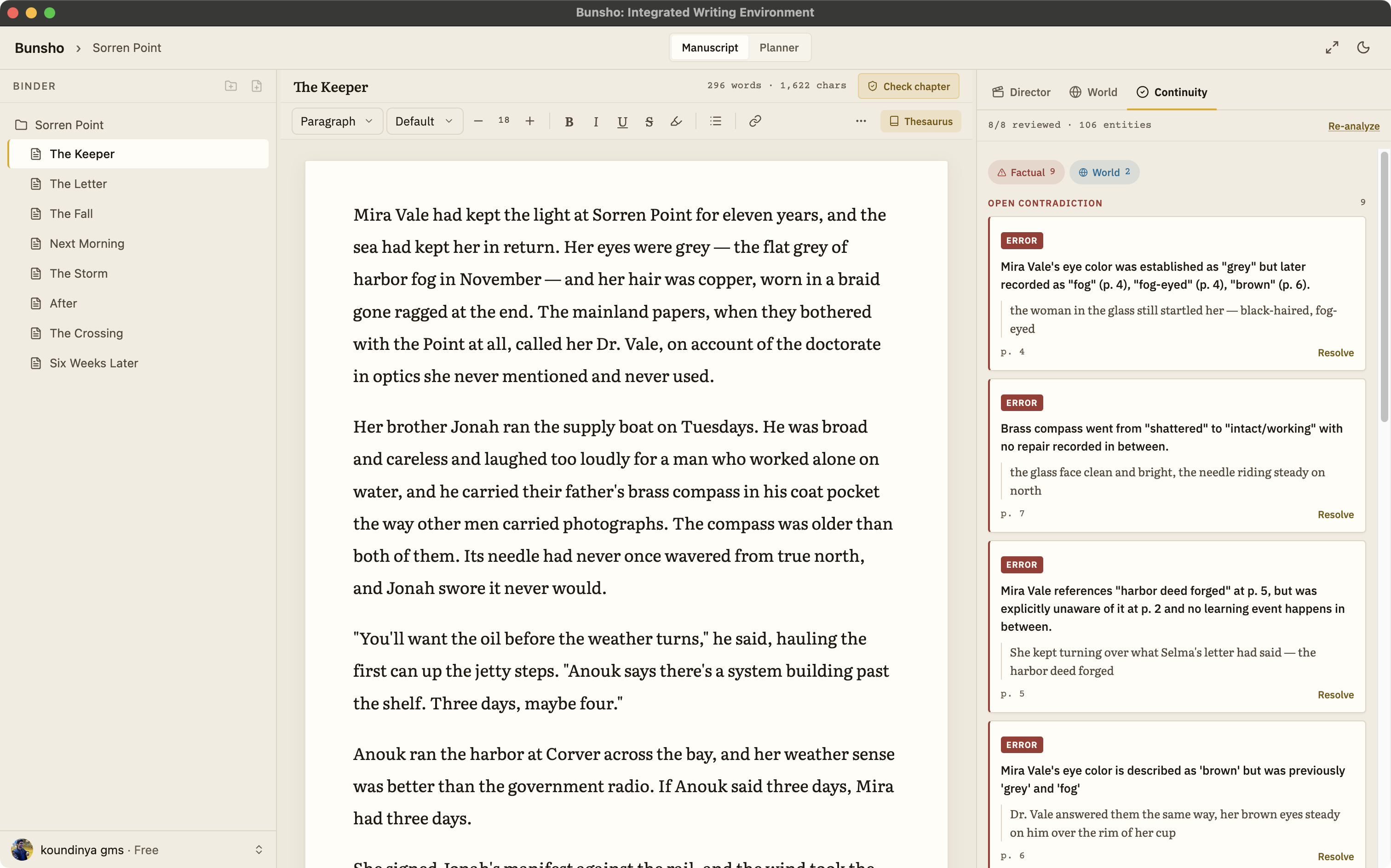
Side by side
NovelCrafter facts below come from its public website as of August 2026 and are kept general on purpose. Check novelcrafter.com for the current details.
| Bunsho | NovelCrafter | |
|---|---|---|
| The story bible | The World tab fills itself from your prose and accepts hand entries as canon; every entry cites the sentence that established it | The Codex, a story bible you maintain, which the AI draws on while generating new scenes |
| Continuity | Checks your chapters against what your story has established and cites both passages when they disagree | No checker that reads finished chapters back for contradictions is described on its site as of August 2026 |
| Where your manuscript lives | Your manuscript lives on your machine. Pages are sent only when you run a check | A web app; your project lives in your account in the browser |
| AI setup | Nothing to configure. Free sign-in with 10,000 starter credits; paid plans include a monthly allowance | Bring your own key: you connect an AI platform of your choice and pay its usage separately |
| Free tier | Free editor with no account and no trial clock, one project; World, Planner, and 10,000 starter AI credits with a free sign-in | 21-day free trial; no permanent free tier described on its pricing page as of August 2026 |
| Pricing (August 2026) | Free $0, Quill $8, Storyteller $15, Saga $29 a month. Writing is never metered | Plans from $4 a month, AI features from the $8 tier, with AI usage billed by your own provider on top |
| Import and export | Import .docx, Markdown, .txt, Fountain. Export .docx, Markdown, Fountain. EPUB on the roadmap | See novelcrafter.com for current formats |
What changes when you switch
The story bible stops being a chore
In Bunsho you do not feed a Codex to keep the AI informed. The World tab fills itself from what you write, each entry tied to the sentence that established it, and anything you add by hand counts as canon alongside it.
Your chapters get read back, not just drawn on
A story bible that only informs generation cannot tell you the manuscript contradicts itself. Bunsho checks your chapters against what your story has established, and each finding cites both passages, so nothing rests on your memory of chapter three.
No keys, no second bill
There is no AI platform to connect and no separate usage bill from a provider. A free sign-in comes with 10,000 starter credits; paid plans include a monthly allowance. Checks show their cost before they run, and writing is never metered.
The manuscript comes home
Bunsho is a desktop app for macOS and Windows. Your chapters are plain files in a folder you choose, and the editor needs no account. Your manuscript lives on your machine, not on our servers. Pages are sent for analysis only when you run a check, and they're never stored or used for training.
Bringing your work over
Export your manuscript from NovelCrafter and import it into Bunsho as .docx, Markdown, plain text, or Fountain. On first import Bunsho offers a full review, cost shown first and skippable, so the World tab starts full on day one. How a finding reads is on the continuity checker page, and the local-first page explains what stays on your machine.
Common questions
Can I bring my NovelCrafter project into Bunsho?
Yes. Export your manuscript from NovelCrafter, then import it into Bunsho as .docx, Markdown, plain text, or Fountain. On first import Bunsho offers a full review of the whole manuscript, with the cost shown before it runs, so your World tab starts full instead of empty.
Do I have to rebuild my Codex by hand?
No. The World tab fills itself from your manuscript: characters, places, objects, and what the story has established about them, each entry tied to the sentence that established it. You can also add entries by hand, and those count as canon too.
Do I need my own AI platform key?
No. NovelCrafter's AI features have you connect an AI platform of your own and pay for usage separately, as of August 2026. Bunsho has no keys to manage: a free sign-in comes with 10,000 starter credits, and paid plans include a monthly allowance. Writing itself is never metered.
Does Bunsho check my chapters automatically?
Only once, on first import, and you can skip it. After that, checking is deliberate: Check this chapter, Review changes, or Run full review, each with the cost shown first. Nothing runs while you type.
Is my manuscript stored in the cloud?
No. Bunsho is a desktop app and your chapters are plain files on your machine. Your manuscript lives on your machine, not on our servers. Pages are sent for analysis only when you run a check, and they're never stored or used for training.
A story bible that reads the book back.
Bunsho is free to download for macOS and Windows. The editor needs no account.