
Local-first
A local-first writing app, so your manuscript stays on your machine
Bunsho keeps your novel as plain files in a folder you choose, with no cloud database in between. Your manuscript lives on your machine, not on our servers. Pages are sent for analysis only when you run a check, and they're never stored or used for training.
Why this matters for a novel
A manuscript is years of work and, until it is published, it is the most private document most writers own. The usual AI writing tools ask you to upload it to their database first and then think about privacy later. Bunsho starts from the other end: the book lives with you, and the only thing that ever travels is what you deliberately send for a check.
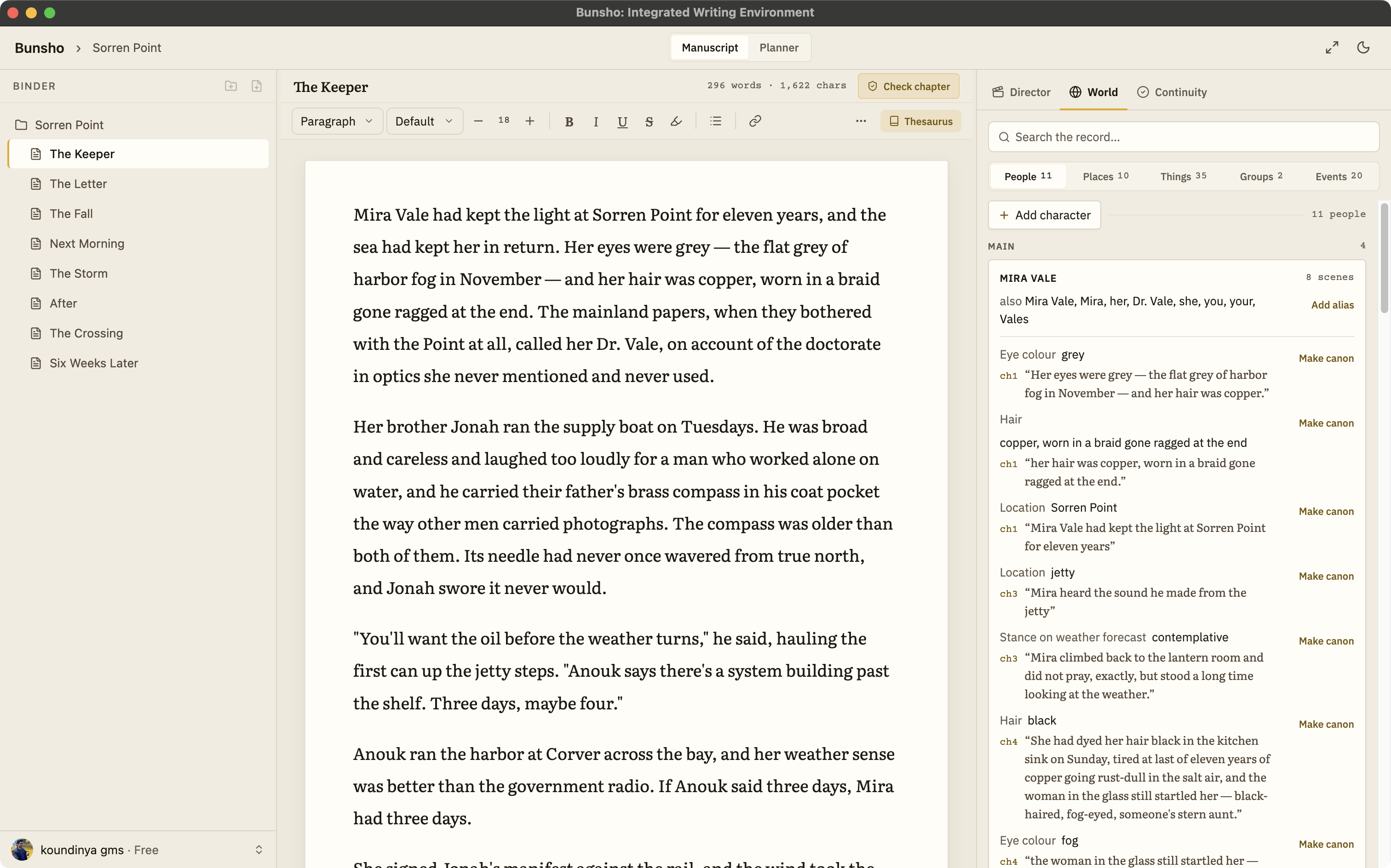
A local writing app for novelists
Local means the book is a folder of plain files you can open in any editor, back up any way you like, and keep when you stop paying. The editor, the World tab and the Planner all run from that folder. Nothing is uploaded to be stored; the only text that ever leaves is the pages you deliberately send for a check, and those are read and discarded. If you have been writing in a browser app and wondering where your manuscript actually is, this is the answer: on your machine, in a folder you named.
What stays, what travels, and when
Your chapters are plain files on disk
A Bunsho project is a folder. Every chapter is a file inside it, readable without Bunsho. There is no proprietary database to export from and no server copy.
Your World and Planner stay local too
The characters, places, and objects Bunsho remembers, and your chapter cards, live in the same project folder alongside the manuscript. They travel with the folder, not with an account.
Your manuscript lives on your machine
Your manuscript lives on your machine, not on our servers. Checking is deliberate: it happens when you press Check this chapter, Review changes, or Run full review, and you see what it will cost first.
Pages are sent only when you run a check
A chapter check sends that chapter. A review of changes sends only the pages that changed since their last check. The rest of the book stays where it is.
Never used for training
Pages sent for a check, a directed scene, or a chat answer are used to produce that result and nothing else. They are not used to train models.
Free editor, optional sign-in
The editor needs no account. You can download Bunsho for macOS or Windows, write a whole book, and export it without ever signing in. A free sign-in unlocks the AI features with 10,000 starter credits, and the paid plans (Quill $8, Storyteller $15, Saga $29 a month) add unlimited projects and a monthly AI allowance. On every plan, the manuscript stays on your machine. Read more about the editor itself on the editor page.
Local-first is not offline-only
The continuity checker and Director Mode run on our servers, because reading a chapter against everything your story has established is real work. What makes Bunsho local-first is not that it never uses the network. It is that the network is a tool you reach for, page by page, rather than the place your book lives. The continuity checker page explains what a check looks like, and the import and export page covers how to get a manuscript in and out.
Common questions
Do I need an account to use Bunsho?
No. Download the editor and write. An account is only needed when you want World, the Planner or the AI features, and a free sign-in unlocks them with 10,000 starter credits. Your manuscript lives on your machine, not on our servers. Pages are sent for analysis only when you run a check, and they're never stored or used for training.
What exactly is sent when I run a check?
The text of the pages you asked to check, so they can be read against what your story has already established. Your manuscript lives on your machine, not on our servers. Pages are sent for analysis only when you run a check, and they're never stored or used for training. A check on one chapter sends that chapter, not the whole book.
Is my manuscript used to train AI models?
No. Pages sent for a check or a directed scene are used to produce that result and are not used to train models. Our Privacy Policy spells this out.
Can I back up or sync the project folder myself?
Yes. A project is an ordinary folder. Time Machine, Dropbox, iCloud Drive, Git, or a USB drive all work. Bunsho does not run its own sync service and does not keep a copy of your manuscript on a server.
What happens to my writing if I cancel or Bunsho disappears?
Nothing. Your chapters are plain files in your folder and they stay readable without us. You can also export to Word, Markdown, or Fountain at any time, on every plan, including Free.
Your book, on your machine.
Bunsho is free to download for macOS and Windows. No account needed to write.