
Features: Planner
Novel outline software with chapter cards
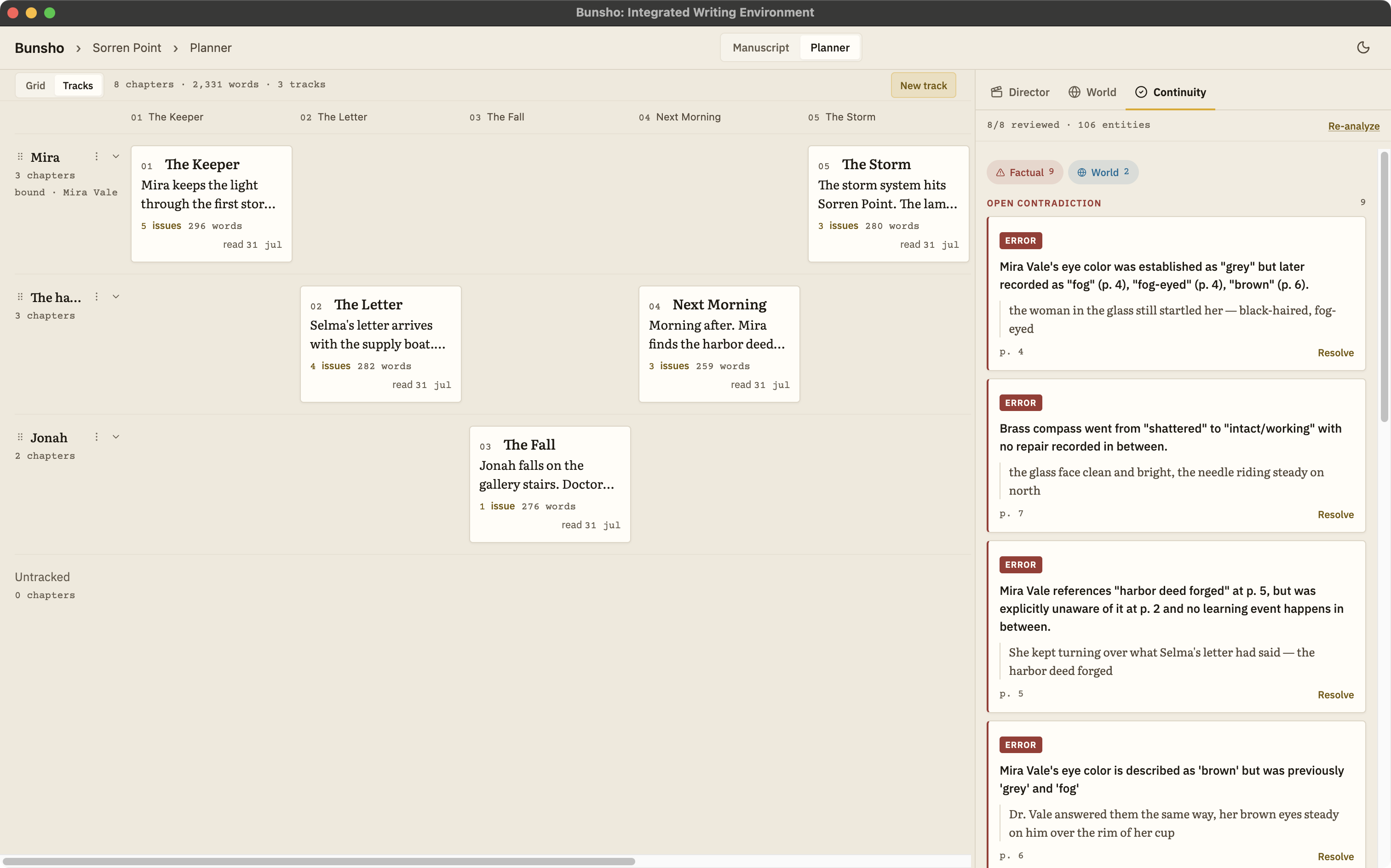
The Planner gives every chapter a card with a description of what that chapter is meant to do. Arrange the cards in a Grid to see the whole book, or on Tracks tied to a character to follow one storyline, and drag to reorder when the shape is wrong.
An outline that lives beside the manuscript
Outlines die in separate documents. The plan says chapter nine is where Selma shows Mira the letter; the draft moved that to chapter eleven three weeks ago; the outline still says nine because nobody went back. Index cards on a corkboard have the same problem with more dust.
Bunsho keeps the Planner inside the project, one tab away from the page. A card describes what a chapter is meant to do. The chapter itself shows what it does. Both are in front of you, which is the only arrangement in which the two stay honest with each other.
How the Planner works
One card per chapter
Every chapter gets a card. Give it a description: the job this chapter does for the book, in a sentence or a paragraph. Plotters write the card first; discovery writers fill it in afterwards. Either way it is yours to revise.
Grid: the whole book at a glance
Grid lays the cards out in reading order. It is the view for pacing questions: three quiet chapters in a row, a reveal that lands too early, a subplot that vanishes for a hundred pages.
Tracks: follow one storyline
Tracks arranges the same cards in lanes. Tie a lane to a character and line up her chapters in it, and you can see where she appears, where she is absent, and how long the reader goes without her.
Drag to reorder
Pick up a card and move it. Trying chapter eleven before chapter nine is a drag, not a rewrite, so you can test a structure before you commit a week to it.
What a chapter is meant to do, and what it does
A description on a card is a statement of intent: this is the chapter where Mira stops trusting her sister. The manuscript is the evidence. Keeping the two side by side makes a particular kind of revision visible, the chapter that is doing something, just not the thing you planned. That is not a continuity error, and Bunsho does not flag it. It is the kind of gap you notice when intent and draft sit on the same screen.
Where the Planner and the continuity checker meet is in the reorder. Move a chapter and the facts it establishes move with it: a character may now know something before she learns it, or carry an object she has not yet been given. Run a check on the chapters you moved and every one of those knots is flagged with both passages in view.
Who the Planner is for
Plotters will recognise the chapter card from every outlining method they have used. Series writers will want Tracks, because following one character across a long book is exactly the problem a Grid cannot show. Scrivener's corkboard comes closest among the tools novelists already own, but its cards are notes next to a draft that knows nothing about them. Bunsho's cards share a project with the World tab and the manuscript, and they stay on your machine with the rest of it.
Common questions
What is a chapter card?
One card per chapter, carrying the chapter's title and a short description of what that chapter is meant to do: the turn it delivers, the question it raises, the thing a character learns. Cards are the unit you drag to reorder the book.
What is the difference between Grid and Tracks?
Grid lays every chapter card out in reading order, which is the view for seeing the whole shape of the book at once. Tracks arranges cards in lanes, and a lane can be tied to a character, so you can follow one storyline through the book and see where it goes quiet.
Do I have to outline before I write?
No. The Planner works for plotters and for writers who outline after the fact. Cards can be written before a chapter exists or filled in once the chapter is drafted, and the description is yours to change at any point.
Does the Planner use AI?
No. Chapter cards, descriptions, Grid, Tracks, and reordering are free and spend no credits; the Planner comes with a free sign-in. The AI features in Bunsho are the continuity checker and Director Mode.
See the shape of the book.
Bunsho is free to download for macOS and Windows. The editor needs no account, and the Planner comes with a free sign-in.