
Alternatives
Scrivener alternatives in 2026: keep the discipline, add a reader
Writers rarely leave Scrivener because the binder failed them. They leave because after years of organizing a manuscript, they want software that also reads it: that knows who their characters are, notices when chapter twelve contradicts chapter three, and keeps the story bible current without another evening of data entry.
Why writers go looking
The pattern is consistent. A novel gets long, or becomes a series, and the organizing tools stop being the bottleneck. The bottleneck becomes memory: which eye color you settled on, what the heroine knew by chapter nine, how many days that journey took the first time you wrote it. Scrivener has no answer to any of that. It has no continuity checking and no AI; its character sheets and metadata are containers you fill and maintain by hand, and nothing in the software ever compares one chapter against another. That is not a flaw in what it set out to be. It is simply the whole category of problem it leaves with you.
So the honest question for 2026 is not which app has a prettier corkboard. It is whether your writing software should finally carry some of the remembering.
What to demand from a Scrivener alternative
Your files, on your machine, in a format you can leave with
Scrivener taught a generation of writers to expect local files. Do not give that up for a browser tab. Bunsho is a desktop app for macOS and Windows, your chapters are plain files in a folder you choose, and export to .docx, Markdown, and Fountain is always there.
A binder that still behaves like a binder
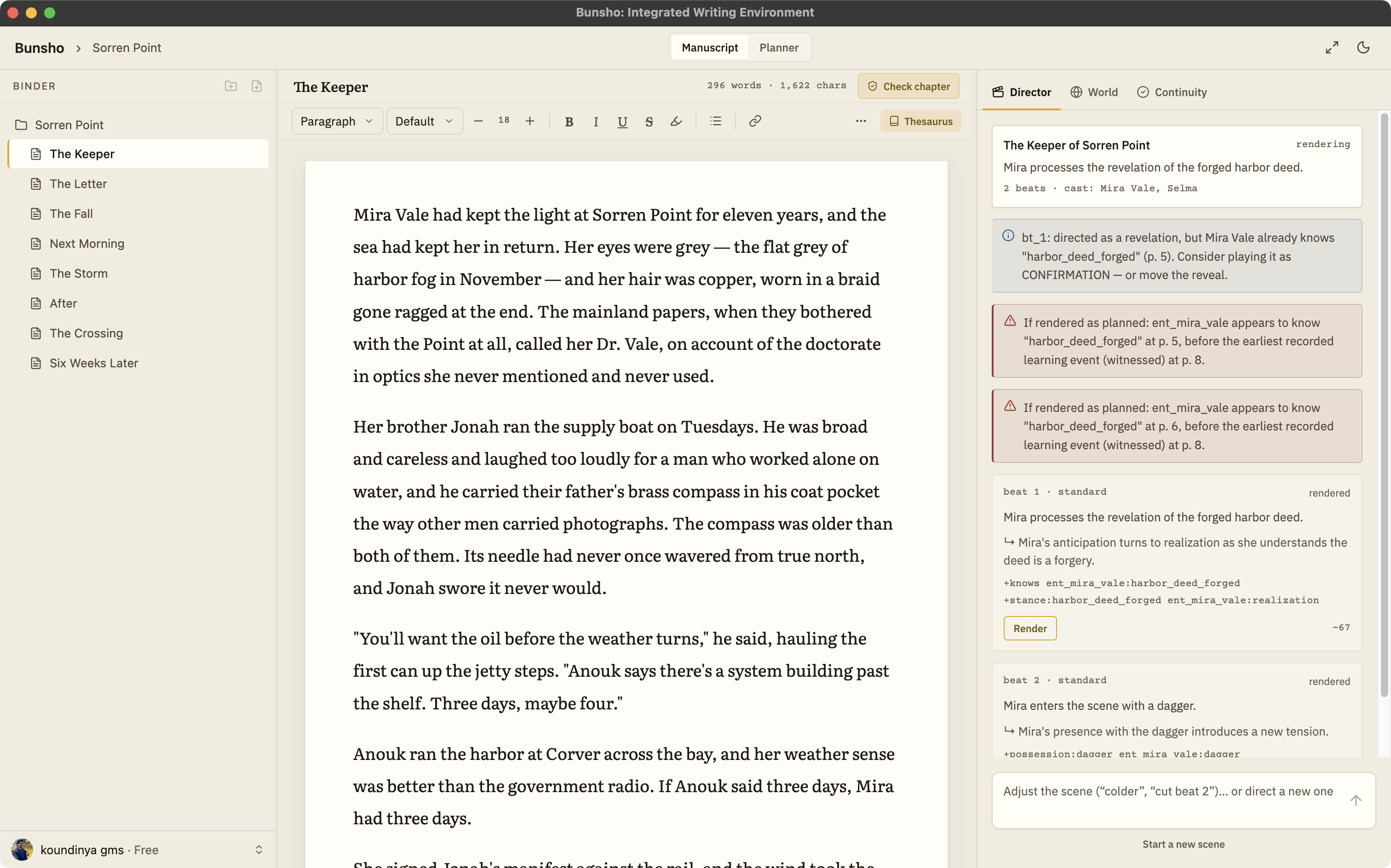
Chapters and scenes you can reorder, a distraction-free page, front matter kept apart from the draft. Bunsho keeps this shape, plus a Planner of chapter cards that records what each chapter is meant to do.
A story bible that maintains itself
Character sheets you type by hand go stale by chapter ten. Bunsho's World tab fills itself from your prose: characters, places, objects, and relationships, each entry tied to the sentence that established it, and it accepts your own entries as canon.
Checking that reads chapters back and cites both passages
The test that separates a real alternative from a reskin: ask it where your manuscript contradicts itself. Bunsho answers with findings that quote both passages, the one that established the fact and the one that broke it, so you can judge each call yourself.
Checking on your schedule, not while you type
Nothing should run while you draft. In Bunsho you check a chapter, review the pages that changed, or review the whole book when you decide to. Writing is never metered, and the editor never interrupts.
Can I bring my work?
Yes, and this matters more than any feature list. Compile your Scrivener draft to Word or plain text, then import it into Bunsho, which accepts .docx, Markdown, .txt, and Fountain. Your chapters land in the binder, and the first import offers a full read of the manuscript with the cost shown before anything runs. After that the World tab holds your cast and places without you having typed a single sheet. Leaving is just as undramatic: export to .docx, Markdown, or Fountain whenever you like, with EPUB export on the roadmap.
Where Bunsho fits
Bunsho is for the writer who liked what Scrivener asked of them, structure, files, ownership, and wants the software to hold up its end now. It is a manuscript editor first, with a continuity checker you run deliberately and a local-first storage model that keeps the manuscript yours. AI features unlock with a free sign-in and 10,000 starter credits; the editor itself never needs an account. Scrivener facts above reflect its public site as of August 2026; it is sold as a paid license, and current pricing is on literatureandlatte.com.
Common questions
Can I bring my Scrivener project into Bunsho?
Yes, through export. Scrivener compiles to Word and plain text, and Bunsho imports .docx, Markdown, .txt, and Fountain. Compile your draft, import it, and your chapters arrive as pages in the binder. On first import Bunsho offers a full read of the manuscript, with the cost shown first and a not-now option, so the World tab starts populated instead of empty.
Does Bunsho have a binder like Scrivener?
Yes. Your manuscript is a binder of chapters and scenes you can reorder, and each chapter opens as a clean page. The difference is what sits beside it: a World tab that fills itself from your prose and a continuity checker you can run on a chapter, on changed pages, or on the whole book.
Is Bunsho a subscription?
The editor is free to download for macOS and Windows and needs no account. Free is $0 with one project, and World and Planner come with a free sign-in. Quill is $8 a month for unlimited projects with no AI. Storyteller is $15 with the continuity checker and a monthly allowance, and Saga is $29 with a higher limit. Writing itself is never metered.
Do my files stay on my machine like they do with Scrivener?
Yes. Bunsho is local-first: your chapters live as plain files in a folder you choose, and the editor works with no account and no connection. Your manuscript lives on your machine, not on our servers. Pages are sent for analysis only when you run a check, and they're never stored or used for training.
What if I do not want AI in my writing software at all?
Then use Bunsho with the AI left alone. The editor works without a sign-in, World and Planner need only a free one, and the Quill plan is built for exactly this: unlimited projects, the full editor, no AI. Nothing generates, suggests, or checks unless you ask it to.
Keep your files. Gain a reader.
Bunsho is free to download for macOS and Windows. The editor needs no account.