
Compare
Bunsho vs Scrivener: a Scrivener alternative with continuity checking
Scrivener organizes a manuscript; nothing in it reads one, so every fact about your story lives in your head or in notes you maintain by hand. Bunsho keeps the binder and the page, and adds the thing Scrivener never had: a memory of what your story has established, and a check against it on demand.
The short version
Scrivener gives you structure: a binder, index cards, snapshots, your research in one project. What it does not do, by design and as of August 2026, is know anything about your story. It cannot tell you that Mara's eyes changed color in chapter nine or that a character answers a letter she never received; catching that is entirely on you and your notes. Bunsho is a manuscript editor built around exactly that gap. You write in a binder and a clean page, the World tab fills itself from your prose, and when you ask for a check, your chapters are read against what the story has established, with both passages cited on every finding.
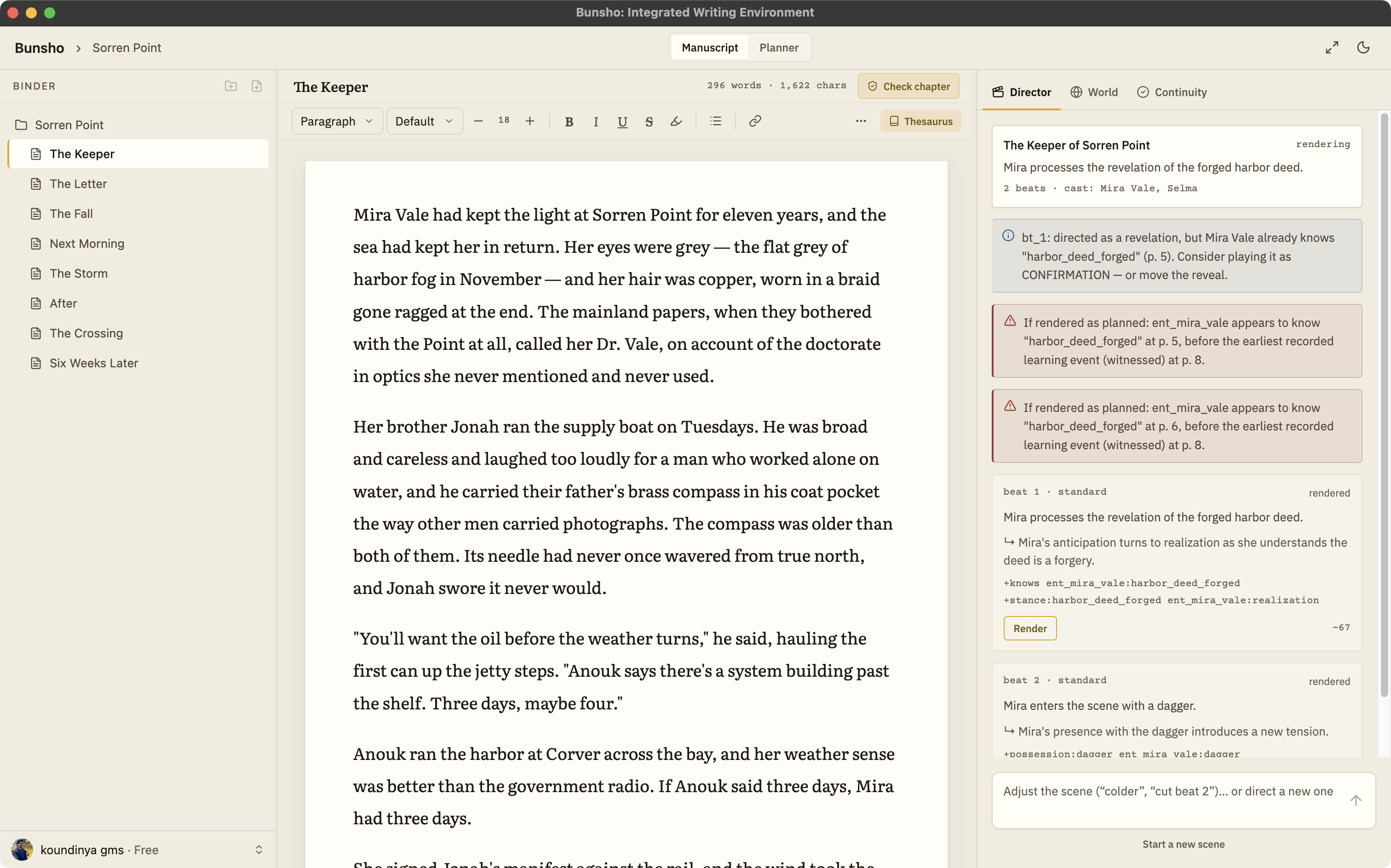
Side by side
Scrivener facts below come from its public website as of August 2026 and are kept general on purpose. Check literatureandlatte.com for the current details.
| Bunsho | Scrivener | |
|---|---|---|
| Built around | Writing and keeping the story straight: binder, page, Planner, and a World that fills itself from your prose | Organizing the writing: binder, corkboard, outliner, snapshots, research in one project |
| Continuity | Checks your chapters against what your story has established and cites both passages when they disagree | Kept by hand, in your head or in notes you maintain; no checking feature is described on its site as of August 2026 |
| AI | Deliberate and optional: a chapter check, a review of changed pages, a directed scene. Nothing runs while you type | None described on its site as of August 2026 |
| The story bible | The World tab fills itself from the manuscript and accepts hand entries as canon, every entry tied to the sentence that established it | Character sheets and notes you write and update yourself |
| Platform | Desktop app for macOS and Windows, one subscription across platforms | macOS, Windows, and iOS, licensed per platform |
| Pricing (August 2026) | Free editor, no account. Quill $8, Storyteller $15, Saga $29 a month. Writing is never metered | One-time licence per platform with a 30-day trial |
| Import and export | Import .docx, Markdown, .txt, Fountain. Export .docx, Markdown, Fountain. EPUB on the roadmap | Compile to common formats |
What changes when you switch
The manuscript gets a memory
Bunsho remembers what your story has established: who knows what, who is where, what is broken, what the compass means. The World tab fills itself from the prose, and hand entries count as canon alongside it.
Continuity stops depending on your notes
When you ask for a check, your chapters are read against what the story has established. Each finding cites both passages, the one that set the fact and the one that broke it, so you rule on it in seconds instead of hunting through the binder.
Checking is deliberate, and writing is free
Nothing runs while you type. You press Check this chapter, Review changes, or Run full review, and the cost is shown before anything runs. Typing, saving, organizing, and exporting are never metered, and the editor needs no account at all.
Your files stay yours
Like Scrivener, Bunsho keeps your work on your machine: chapters are plain files in a folder you choose. Your manuscript lives on your machine, not on our servers. Pages are sent for analysis only when you run a check, and they're never stored or used for training.
Bringing your work over
Compile your draft out of Scrivener to .docx, Markdown, or plain text and import it into Bunsho. On first import Bunsho offers a full review, cost shown first and skippable, so the World tab starts full on day one. The editor page covers the binder, focus mode, and files; how a finding reads is on the continuity checker page.
Common questions
Can I bring my Scrivener project into Bunsho?
Yes. Compile your draft out of Scrivener to .docx, Markdown, or plain text and import it into Bunsho; Fountain works too for screenplays. On first import Bunsho offers a full review of the manuscript, with the cost shown before it runs, so the World tab starts full instead of empty.
Does Bunsho have a binder like Scrivener's?
Yes. Your manuscript lives as chapters in a binder beside a clean page, with a focus mode when you want the room to go quiet. The difference is what sits behind the page: Bunsho remembers what your story has established, and the Planner holds chapter cards for the shape of the book.
Do I have to use the AI features?
No. The editor is free with no account, and the Quill plan at $8 a month is a deliberate no-AI tier with unlimited projects. Nothing checks or generates anything unless you ask it to; checking runs only when you press Check this chapter, Review changes, or Run full review.
Is Bunsho a subscription while Scrivener is a one-time purchase?
Scrivener sells one-time licences per platform as of August 2026. Bunsho's editor is free outright with no account, and the paid plans are monthly: Quill $8 without AI, Storyteller $15 with the continuity checker, Saga $29 with a higher allowance. Writing itself is never metered on any plan.
Where does my manuscript live?
On your machine, as plain files in a folder you choose, on macOS and Windows. Your manuscript lives on your machine, not on our servers. Pages are sent for analysis only when you run a check, and they're never stored or used for training.
The binder, the page, and a memory that checks.
Bunsho is free to download for macOS and Windows. The editor needs no account.