
Alternatives
Sudowrite alternatives for writers done with metered generation
Most writers searching for a Sudowrite alternative are not looking for a different generator. They are done with the shape of the thing: a browser app, a subscription meter attached to the words, and an AI whose only answer to every problem is more prose. If that is where you are, the useful question is what to demand from the next tool.
Why writers leave
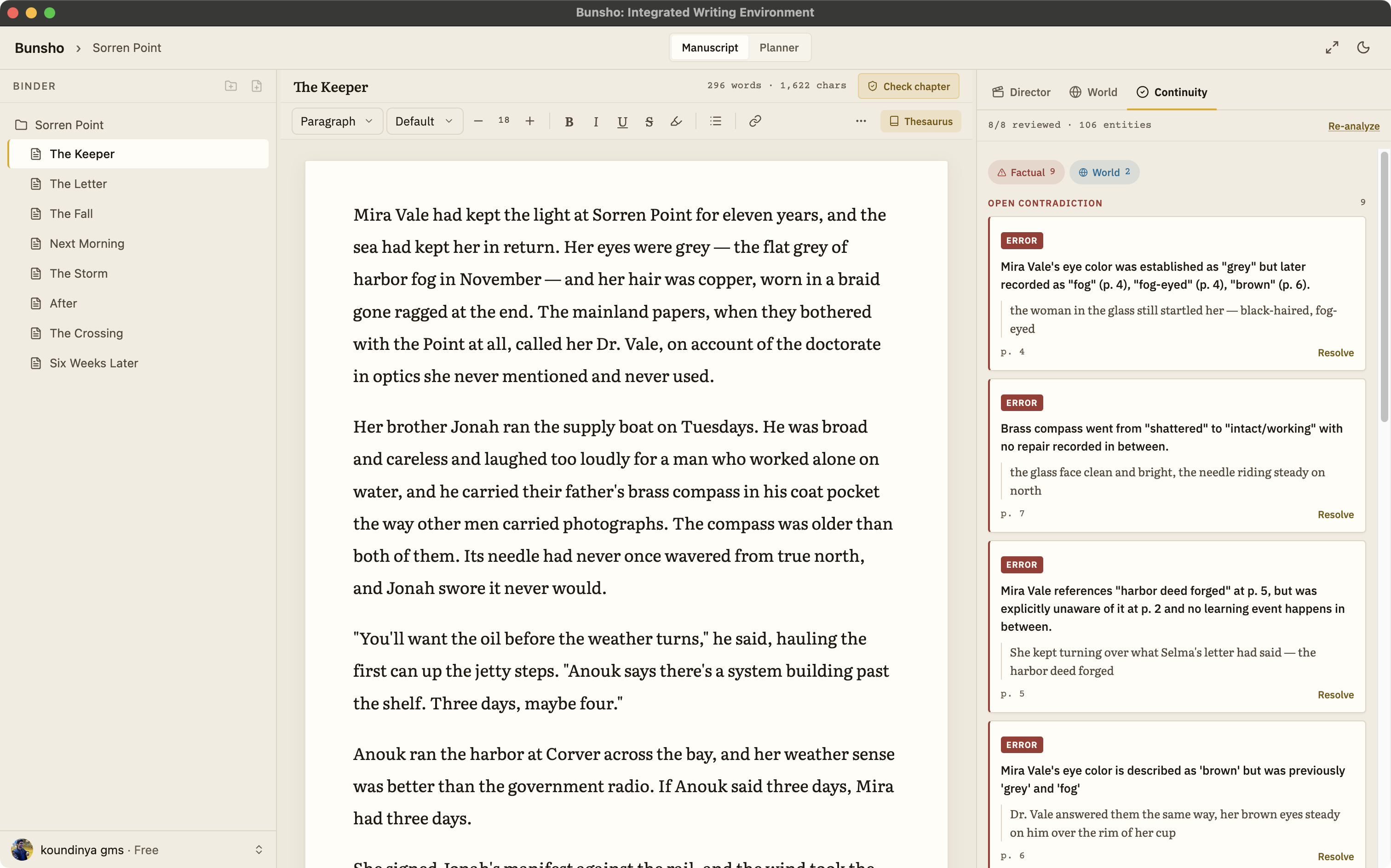
The reasons repeat. The manuscript lives in a web app instead of in files you hold. The credit meter creates a quiet pressure to make every session pay. And after enough generated passages, many writers notice the real problem was never getting words onto the page. It was keeping four hundred pages of words consistent with each other, and nothing in Sudowrite reads your finished chapters back and tells you, with both passages quoted, where they disagree. Its site describes no such feature as of August 2026.
What to demand from a Sudowrite alternative
Own your files
The manuscript should be plain files on your machine, not rows in someone's database. Bunsho is a desktop app for macOS and Windows; your chapters live in a folder you choose, the editor works with no account, and export to .docx, Markdown, and Fountain is always available.
Writing that is never metered
No meter should be aware of your typing. In Bunsho, credits buy deliberate AI moments with the price shown before you commit: a chapter check, a review of changed pages, a directed scene. Drafting, revising, and organizing are free forever, and nothing runs while you type.
Checking, not generating
Demand an AI that reads instead of writes: one that knows what your story has established and flags the chapter that breaks it, citing the passage that set the fact and the passage that contradicts it. This is Bunsho's core feature, not an add-on.
A story bible you do not maintain
Filling in bible fields by hand is homework. Bunsho's World tab builds itself from your prose, entry by entry, each one tied to the sentence that established it, and takes your own additions as canon.
Drafting that answers to your canon, when you want it
If you do want AI drafting, it should be directed, not autocomplete. Bunsho's Director Mode works beat-sheet-first: you say what happens, approve the plan, and one voice writes the scene as suggestions checked against your story. It will not invent plot.
Can I bring my work?
Yes. Export your draft from Sudowrite as Word or plain text and import it into Bunsho, which accepts .docx, Markdown, .txt, and Fountain. The first import offers a full read of the whole manuscript, with the cost stated before anything runs, and from then on the World tab carries your cast and places for you. There is no lock-in on the way out either: export to .docx, Markdown, or Fountain any time, with EPUB on the roadmap.
Where Bunsho fits
Bunsho is the alternative for writers who kept the ambition and dropped the generator: you write the prose, and the software keeps the story straight. The continuity checker runs when you ask and cites both passages in every finding, and Director Mode is there for the scenes you would rather direct than type. For a feature-by-feature view, see Bunsho vs Sudowrite.
Common questions
Can I bring my Sudowrite project into Bunsho?
Yes. Get your draft out as a Word or plain text file and import it into Bunsho, which accepts .docx, Markdown, .txt, and Fountain. Your chapters arrive as pages, and the first import offers a full read of the manuscript, cost shown up front and skippable, so the World tab starts populated with your cast, places, and timeline.
Does Bunsho write prose the way Sudowrite does?
Not unprompted, and never as autocomplete. In Director Mode you describe what happens in a scene, Bunsho drafts a beat sheet first, checks it against what your story has established, and only then writes the scene as suggested blocks you accept or discard. It has no button that continues your text, and it does not invent plot.
Is Bunsho's AI metered too?
The AI is credit-based, but the meter only runs on deliberate actions you price-check first: a chapter check, a review of changed pages, a full review, a directed scene. Typing, saving, organizing, and exporting cost nothing, ever. A free sign-in comes with 10,000 starter credits, and the editor itself needs no account at all.
How does pricing compare?
Sudowrite starts at $10 a month with a free trial, as of August 2026; see sudowrite.com for its current plans. Bunsho's editor is free for macOS and Windows. Free is $0 with one project, Quill is $8 a month with no AI, Storyteller is $15 with the continuity checker and a monthly allowance, and Saga is $29 with a higher limit.
Where does my manuscript live?
On your machine, as plain files in a folder you choose. Bunsho is a desktop app, not a browser tab, and the editor works offline with no account. Your manuscript lives on your machine, not on our servers. Pages are sent for analysis only when you run a check, and they're never stored or used for training.
Your words, your files, your meter under your thumb.
Bunsho is free to download for macOS and Windows. The editor needs no account.