
Compare
Bunsho vs Dabble: a Dabble alternative that checks your story
Dabble is a lovely place to plot and write a novel, but nothing in it reads what you wrote, so every fact about your story lives in your notes and your memory. Bunsho gives you the binder, the planner and the story notes, and adds the thing Dabble doesn’t have: a memory of what your story has established, and a check against it whenever you ask.
The short version
Dabble helps you organize a novel: a plot grid, a story notebook, character profiles, word-count goals, and your book on every device. What it doesn’t do, as of September 2026, is know anything about your story. It can’t tell you that Mara’s eyes changed colour in chapter nine, or that a character answers a letter she never received. Catching that is on you and your notes. Bunsho is built around exactly that gap. You write in a binder and a clean page, plan with chapter cards, the World tab fills itself from your prose, and when you ask for a check, your chapters are read against what the story has established, with both passages cited on every finding.
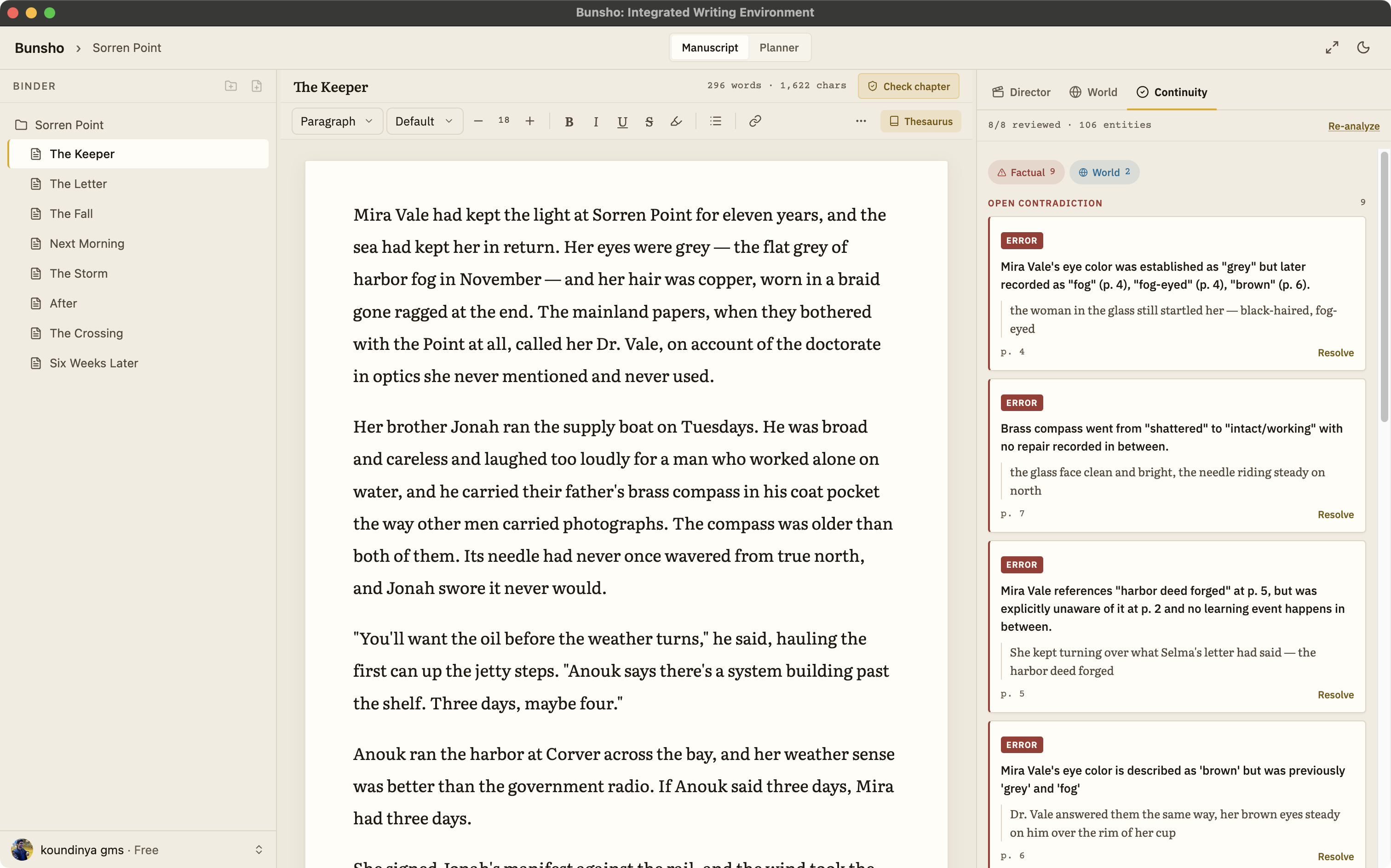
Side by side
Dabble facts below come from its public website and help pages as of September 2026 and are kept general on purpose. Check dabblewriter.com for the current details.
| Bunsho | Dabble | |
|---|---|---|
| Built around | Writing and keeping the story straight: binder, page, Planner, and a World that fills itself from your prose | Plotting, writing and editing in one cloud app: plot grid, story notebook, goals, on every device |
| Continuity | Checks your chapters against what your story has established and cites both passages when they disagree | Kept by hand with the plot grid, story notes and character profiles; no contradiction checking is described on its site as of September 2026 |
| Story notes | The World tab fills itself from the manuscript and accepts hand entries as canon, every entry tied to the sentence that established it | Character profiles and a worldbuilding notebook you write and update yourself |
| AI | Optional and deliberate: a chapter check, a review of changed pages, a directed scene. Nothing runs while you type. Quill is a no-AI plan | AI-free by design, per its help docs; grammar checks run on an established grammar engine |
| Where your book lives | On your machine, as plain files in a folder you choose | In Dabble's cloud, synced across devices, with offline writing once installed |
| Platforms | Desktop app for macOS and Windows | Web, macOS, Windows, Linux, iOS and Android |
| Working with others | One writer; export to Word for beta readers and editors | Live co-authoring, plus review copies for beta readers and editors on its Author plan |
| Pricing (September 2026) | Free editor, no account. Quill $8, Storyteller $15, Saga $29 a month. Writing is never metered | Plans from $19 a month after a 14-day trial, with higher tiers and a lifetime option |
| Import and export | Import .docx, Markdown, .txt, Fountain. Export .docx, Markdown, Fountain | Export to Word, Web, Markdown and Google Docs |
What you get on top
Story notes that write themselves
In Dabble you keep the notebook up to date. In Bunsho the World tab fills itself from what you write: characters, places, objects and rules, each tied to the sentence that established it. Add or correct an entry by hand and it counts as canon.
A check on the whole book
Press Check this chapter, Review changes or Full review, and your chapters are read against what the story has established. Each finding shows both passages, the one that set the fact and the one that broke it, so you decide in seconds.
Your files on your machine
Chapters are plain files in a folder you choose. Only the pages you ask to check are sent, and they are never used to train models.
A free editor, and a lower price
The editor is free with no account. Quill is $8 a month with no AI, and Storyteller, with the continuity checker, is $15. Writing itself is never metered on any plan.
When Dabble is the better fit
If you write on your phone as much as your laptop, co-write live with a partner, or want a big community with workshops and courses around your writing tool, Dabble does those things well today, and Bunsho doesn’t yet. If your book is long, part of a series, or full of details you can’t afford to get wrong, that is what Bunsho is for.
Bringing your work over
Export your manuscript from Dabble to Word or Markdown and import it into Bunsho. On first import Bunsho offers a full review, cost shown first and skippable, so the World tab starts full on day one. The Planner page covers chapter cards; how a finding reads is on the continuity checker page.
Common questions
Can I bring my Dabble manuscript into Bunsho?
Yes. Export your manuscript from Dabble to Word or Markdown and import it into Bunsho. On first import Bunsho offers a full review of the manuscript, with the cost shown before it runs, so the World tab starts full instead of empty.
Dabble is AI-free. Does Bunsho write for me?
Not unless you ask it to. Bunsho never writes while you type and never rewrites your manuscript on its own. Its AI checks your chapters when you press a button, and drafts a scene only when you direct one and choose to keep it. If you want no AI at all, the Quill plan at $8 a month is a deliberate no-AI tier.
Does Bunsho have a plot grid like Dabble's?
Bunsho's Planner holds chapter cards with a Grid view and a Tracks view, and a description of what each chapter is meant to do beside the manuscript that shows what it actually does. It is part of the free editor and needs no account.
Can I write on my phone or co-write with Bunsho?
Not yet. Bunsho is a desktop app for macOS and Windows, built for one writer working across many manuscripts. If writing on your phone or live co-authoring is essential to how you work, Dabble does that well today.
Where does my manuscript live?
On your machine, as plain files in a folder you choose. Only the pages you ask to check are sent for analysis, and they are never used to train models.
Plot it, write it, and let Bunsho check it.
Bunsho is free to download for macOS and Windows. The editor needs no account.