
The editor
Distraction-free novel writing software that stays out of your way
Bunsho is a manuscript editor for macOS and Windows with a binder, a clean page, and a focus mode, and your chapters are saved as plain files on your machine. Writing is never metered and the editor needs no account.
What you see when you open it
Three panes: the binder on the left, the page in the middle, and the story panel on the right. Close the side panes and it is a page on paper. That is the whole interface, and it was built to be the last thing you notice.
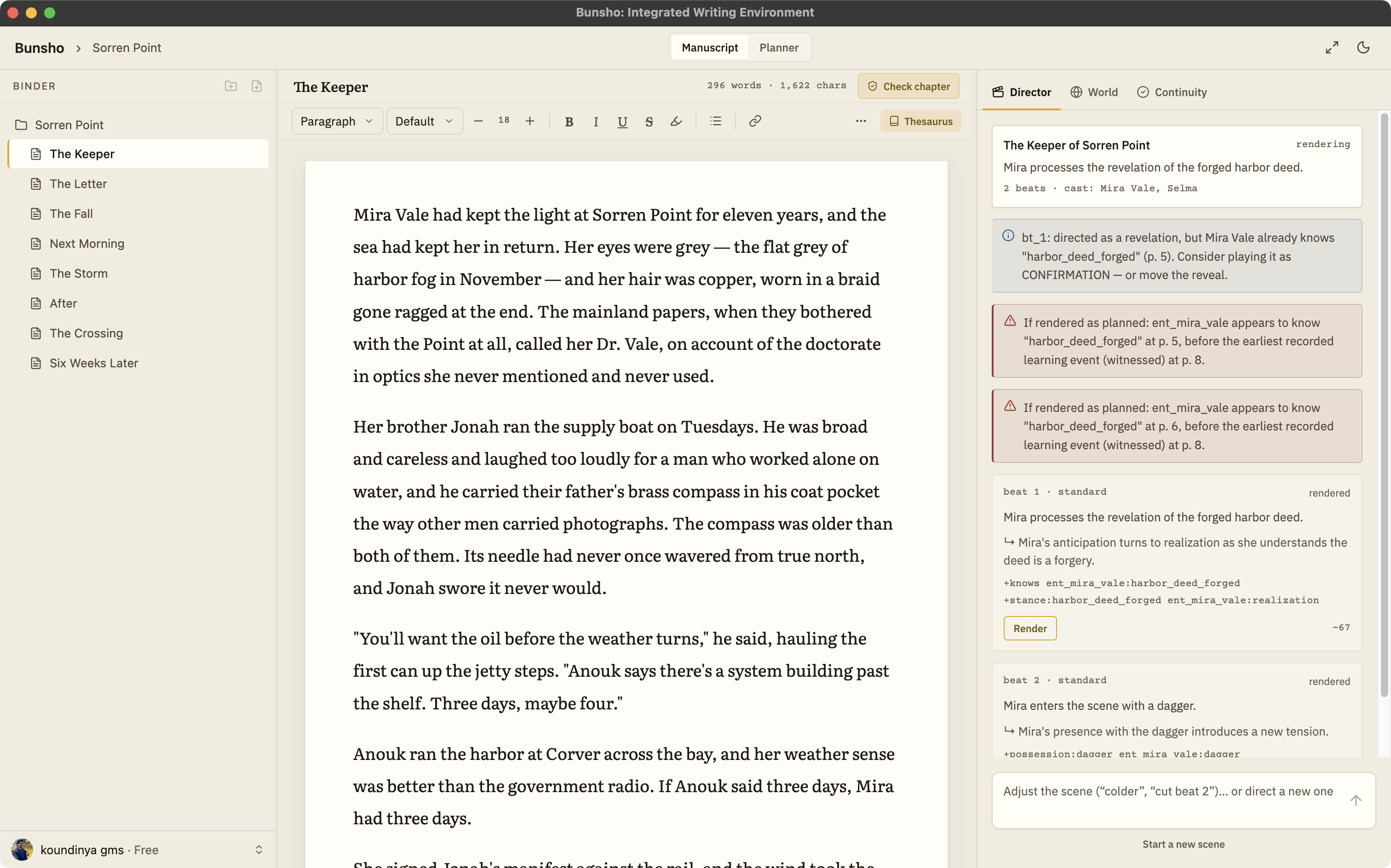
Built for long work, not short bursts
A binder for the whole book
Chapters and scenes sit in a tree on the left, in manuscript order, so the shape of the book is always in view. Nothing is buried in a tab or a menu.
A page that looks like a page
Warm paper by day and a dark lamplight theme by night. Adjust the font size to what your eyes want at eleven at night, and leave it there.
Focus mode with one shortcut
Press Cmd Shift F and the binder and side panel fall away, leaving the page and nothing else. Press it again to bring the room back.
Spellcheck that knows your world
Add your invented names, places, and terms to a custom dictionary once. A thesaurus is built in.
Never metered
Typing, saving, reorganizing, and exporting are free on every plan, always. Credits are only spent on the AI moments you ask for, like a chapter check or a directed scene.
Your files are files
A Bunsho project is a folder on your disk. Your chapters are plain files inside it. That means Time Machine, Dropbox, iCloud Drive, or a USB stick all work as backups without any help from us, and if you ever stop using Bunsho, your manuscript is still right there. Read more about what stays on your machine and what is sent, and when, on the local-first page.
Bringing a draft in from Word or Scrivener? Bunsho imports .docx, Markdown, plain text, and Fountain. See the import and export page for the full list of formats.
The rest of the room, when you want it
The editor is the centre of Bunsho, but it is not the reason most writers install it. The World tab fills itself with your characters, places, and objects read from your manuscript, each one tied to the sentence that established it. The Planner holds chapter cards with what each one is meant to do. And when you are ready, the continuity checker reads the chapters you choose and checks them against what your story has established, citing both passages when something does not line up. None of it runs until you ask. Until then, it is a quiet page.
Common questions
Is the editor really free?
Yes. Download Bunsho for macOS or Windows and start writing. No account is needed for the editor. The free plan includes one project, and a free sign-in opens the World and Planner tabs inside it, unrestricted. Quill, at $8 a month, lifts the limit to unlimited projects and adds no AI at all, for writers who only want the editor.
Does the AI interrupt me while I write?
No. Nothing runs while you type. The continuity checker reads your chapters only when you ask for a check, and Director Mode only drafts when you direct a scene. Writing, saving, organizing, and exporting are never metered and never cost credits.
Where are my files stored?
On your machine, as plain files in a folder you choose. There is no cloud database holding your manuscript. You can back the folder up, sync it with any service you already use, or open the chapters in another program.
Can I bring in a manuscript I have already started?
Yes. Bunsho imports Word (.docx), Markdown, plain text, and Fountain files, and exports to .docx, Markdown, and Fountain. EPUB export is on the roadmap.
Does it have spellcheck and a thesaurus?
Yes. Spellcheck runs with a custom dictionary you can add your invented names and words to, so a fantasy cast stops lighting up red. A thesaurus is built in. Font size, a paper theme, and a dark theme are all adjustable.
A quiet page, and a whole book behind it.
Bunsho is free to download for macOS and Windows. No account needed to start writing.