
The World tab
Story bible and lore software that writes itself
Bunsho reads your manuscript and fills in the story bible for you: characters, places, objects, relationships, world rules and lore, each tied to the sentence that established it. It works both ways, so what you add by hand becomes canon and your chapters are checked against it.
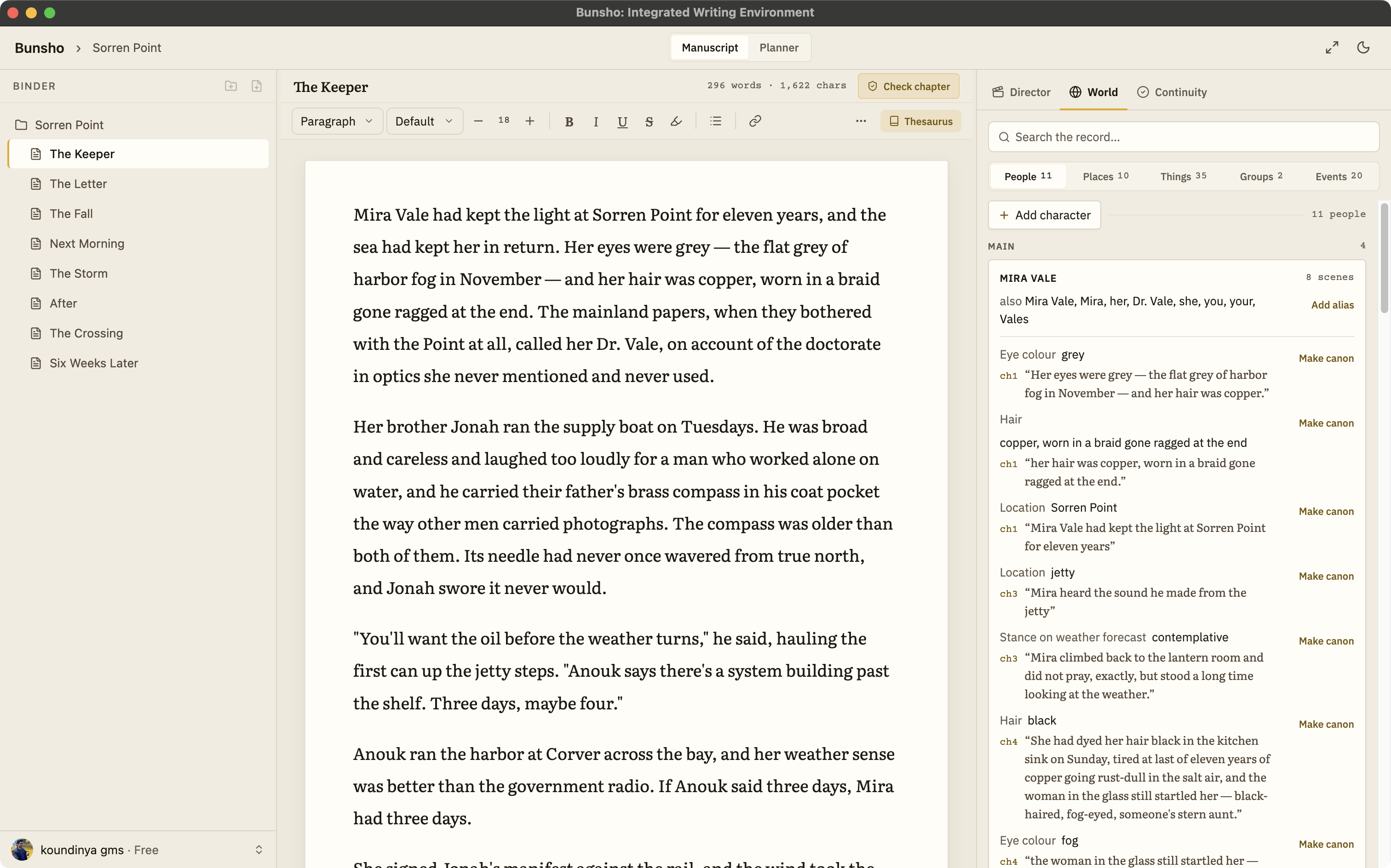
Why story bibles fall behind
Every novelist has started one. A spreadsheet of characters, a document of place names, a page of rules for how magic or money or the law works in the book. Then the draft takes over. The bible says one thing, chapter nineteen says another, and neither gets corrected because keeping the two in step is a second job nobody signed up for.
The problem is not discipline. It is that a bible kept in a separate document has no way of knowing what the manuscript says. Bunsho keeps the bible inside the editor and lets the manuscript do the filing.
How the World tab works
It fills itself from your chapters
When Bunsho reads a chapter, the characters, places, objects, and relationships it finds appear as entries in the World tab. You do not retype a fact you have already written into the prose.
Every found entry shows its source
A found entry is tied to the sentence that established it. Open a character and you can see where the manuscript first gave her an age, a scar, a sister, or a secret.
Hand entries are canon
Add a character before she has a scene, correct a detail, or pin a rule of your world. The continuity checker treats what you wrote there as the truth and measures your chapters against it.
It is two-way
Most story bible tools are a place to take notes. In Bunsho the bible is also what the continuity checker reads, so a bible entry is not a reminder to yourself but a fact the software holds your manuscript to.
It lives on your machine, not on our servers
Manuscripts and the World tab stay on your computer. Your manuscript lives on your machine, not on our servers. Pages are sent for analysis only when you run a check, and they're never stored or used for training.
What a bible entry looks like
Open a character and you get what a careful reader would have noted: traits and physical details, where she has been, what she owns, who she is tied to, and what she knows. Open a place and you get who has been there and what happened. Open an object and you see what the manuscript has said about it and where. Each line that came from the manuscript points back at its sentence; each line you wrote yourself is marked as yours.
That matters at revision time. Change a character's age in the World tab and then run a full review, and every chapter that disagrees with the new age is flagged with both passages in view. The bible stops being a document you consult and becomes a standard your book is held to.
Lore: the rules your world has to keep
Lore is the part of a story bible that fantasy and science fiction writers cannot do without and most tools treat as a notes field: how the magic is paid for, which house holds which city, what the ship can and cannot do, who may enter the archive. In Bunsho those rules are entries like any other. Write that a spell costs a memory in chapter two and the World tab records it, tied to that sentence. Add a rule by hand before you have used it and it counts as canon.
Then the rule works for you. Run a check on chapter fourteen and, if a character casts without paying, the finding shows the rule and the scene that broke it, side by side. The same holds for invented places and factions: a city that moves rivers between chapters, a guild whose name drifts, a border that sits on the wrong side of the mountains. Writers who prefer to draft the bible first can start from the free story bible template and story timeline template, then let the manuscript take over the filing.
Story bible versus the alternatives
Scrivener gives you a binder for character sheets, but the sheets know nothing about the draft beside them. A spreadsheet is faster to search and just as blind. Sudowrite and NovelCrafter keep a bible the AI reads while it drafts, which helps it write but does not tell you when your own chapters disagree. Bunsho's World tab is built for the other direction: it is the memory the continuity checker reads, and the same memory Director Mode answers to when it drafts a scene.
For a closer look at how characters, places, objects, and relationships are tracked, see the World tab feature page.
Common questions
What is story bible software?
A story bible is the reference a writer keeps about their own book: who the characters are, where places sit, what objects matter, and which rules the world obeys. Story bible software keeps that reference next to the manuscript instead of in a separate document. Bunsho goes one step further: the World tab fills itself from your chapters, so the bible stays current without you retyping facts you have already written.
Do I have to build the bible before I start writing?
No. Start with a blank project or import a manuscript as docx, markdown, txt, or fountain. After a read, the World tab lists what your prose has established. You can also add entries by hand at any point, before a character has a scene or after you decide a detail should change.
What happens if I edit an entry by hand?
Hand entries are canon. If you write that Mira's eyes are grey, the continuity checker treats grey as the truth and flags a chapter that says otherwise. Found entries, the ones read from your manuscript, stay tied to the sentence that established them so you can see where each fact came from.
Can I use the World tab without the AI features?
Yes. The editor is free to download and needs no account, and World and Planner come with a free sign-in. Reading entries out of your manuscript and checking chapters against the bible are AI features, and that sign-in comes with 10,000 starter credits for them.
Is this lore software for fantasy and science fiction?
Yes. World rules, magic systems, invented places, factions and technology are entries in the World tab like characters are. A rule read from your prose stays tied to the sentence that set it; a rule you add by hand is canon. When a later chapter breaks one, a check shows the rule and the scene together.
Does it cover a whole series?
Today each project has its own World. Cross-book series canon, one bible shared across every book in a series, is on the roadmap. It is the request we hear most from series writers.
A story bible that keeps itself current.
Bunsho is free to download for macOS and Windows. The editor needs no account; World and Planner come with a free sign-in.