
Screenwriting software for Mac
Screenwriting software for Mac: the options in 2026
The Mac has the deepest bench of screenwriting software of any platform. Every major formatter runs on it, and two of the best Fountain apps, Highland and Beat, are Apple-only. The real choice on a Mac is not whether an app runs, but which job you need done: industry delivery, a plain-text writing experience, a free setup, or a check that the story holds together.
The short answer
For industry-standard work on a Mac, Final Draft 13. For the same capability at a lower one-time price, Fade In. For a polished Fountain app that also runs on iPad and iPhone, Highland Pro. For a free Fountain app, Beat. For a free app that also runs on your other computers, Starc. For co-writing, WriterDuet. For checking your script's continuity, Bunsho, alongside one of those for the PDF.
Mac screenwriting apps compared
| On a Mac | Price | Formats | |
|---|---|---|---|
| Final Draft 13 | macOS 12 or later; also Windows | $249.99 one-time list, often on sale | Native .fdx, PDF; Fountain only as a plain-text import |
| Fade In | Intel and Apple Silicon; same licence covers Windows and Linux | $79.95 one-time | .fdx, Fountain import, PDF |
| Highland Pro | Mac, iPad and iPhone, synced over iCloud | $59.99 a year or $9.99 a month | Fountain-based; PDF and .fdx per its knowledge base |
| Beat | Free, open source, macOS; paid iOS app | Free | Fountain-native; .fdx and PDF export |
| Starc | macOS plus Windows, Linux, iOS, Android | Free tier; Pro $150 lifetime | .fdx, Fountain, PDF |
| WriterDuet | Browser; desktop app on paid plans | Free plan; Plus $9.99 a month | .fdx, Fountain, PDF |
| Bunsho | macOS and Windows | Editor free; checks on Storyteller or Saga | Fountain import and export only |
As of October 2026, from each vendor's site. Confirm current prices before you buy.
Why Fountain is a good fit on a Mac
Mac screenwriters have long led the move to Fountain, the plain-text screenplay format, and the Mac has the strongest Fountain apps: Highland, Beat, and Fade In and Starc, which both import it. Writing in Fountain means your script is ordinary text that opens in any editor, survives any app going away, and moves between tools without conversion. Bunsho imports and exports Fountain on every plan, so it slots into a Mac Fountain workflow without asking you to change formats.
What Bunsho does on a Mac
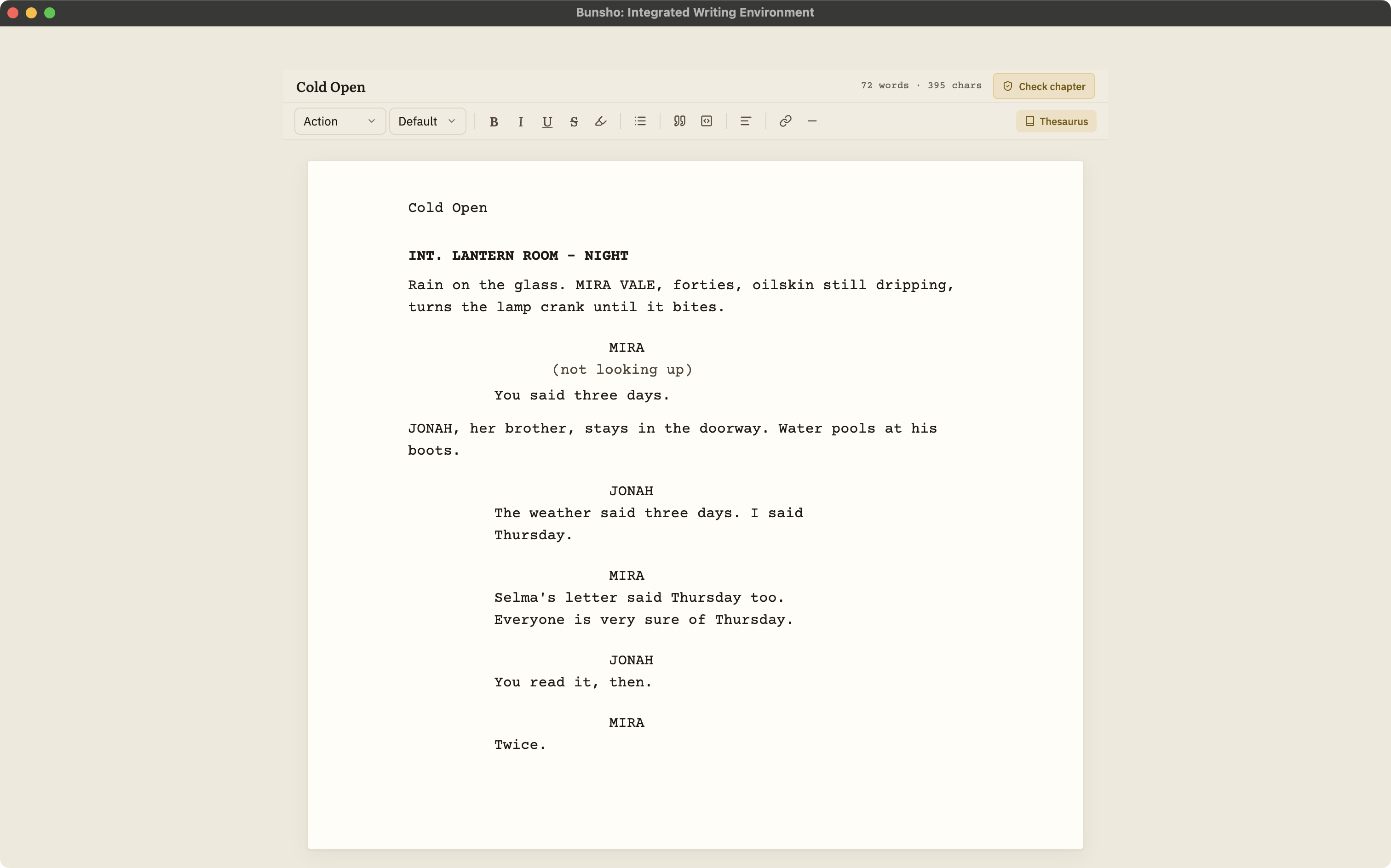
The six standard elements, formatted as you type
Slugline, action, character, parenthetical, dialogue and transition, with an element picker, ghost hints that show what each line expects, Tab and Enter cycling, and autocomplete for sluglines and character names.
Fountain import and export
Open a .fountain script as a project and export back to .fountain, title page included, whenever you like. Neither direction is ever metered.
Continuity checking for scripts, when you ask
Bunsho checks your script scene by scene against what it has established: sluglines and scene order, who is in each scene, props and wardrobe, and what a character can know when. Every finding cites both passages. Checks are priced per scene, the cost is shown before each one, and they are live on Storyteller and Saga.
Your files, on your disk
Scripts live as plain files in a folder you choose. The editor works with no account and no connection. Your manuscript lives on your machine, not on our servers. Pages are sent for analysis only when you run a check, and they're never stored or used for training.
Where Bunsho stops
Bunsho is not trying to be your delivery formatter, and a Mac user has excellent ones available. Use it for drafting and checking, then hand the Fountain file to Highland, Beat or Fade In for the PDF or .fdx.
No PDF export
Produce the submission PDF in a formatter: Highland, Fade In, WriterDuet, Beat, Starc and others all open Fountain.
No Final Draft .fdx
Bunsho reads and writes Fountain only. Convert .fdx in an app that reads both.
No real-time collaboration
Bunsho is a single-writer desktop app.
No production tools
No revision colors, locked pages, breakdowns or scheduling, and no dual dialogue.
A Mac workflow that uses each app for its strength
Draft in whichever app you enjoy most; on a Mac that is often Highland or Beat. When a draft is ready, export Fountain and import it into Bunsho, then run a continuity check on the scenes that changed or the whole script, with the price shown before it runs. Fix what needs fixing, export Fountain again, and produce the PDF in your formatter. If a production needs .fdx, Highland, Beat and Fade In all write it. Bunsho does not run on iPad or iPhone, so mobile drafting stays in Highland or Beat.
Keep reading
Two Fountain apps with different jobs, and how to use both.
What each free tier actually allows.
The full guide: formats, collaboration, revisions, price, file ownership, and where Bunsho fits.
Ten apps side by side, each placed by what it is best for.
Screenplay continuity checking in detail: what it reads, what a finding looks like, what it costs.
Common questions
What is the best screenwriting software for Mac?
For industry work, Final Draft 13 or the cheaper Fade In. For writing in Fountain on Mac, iPad and iPhone, Highland Pro. For free, Beat or Starc. For checking a script's continuity, Bunsho, used with one of those for the PDF.
Is there free screenwriting software for Mac?
Yes. Beat is free and open source on macOS, and Starc has a free-forever tier. Both export PDF and .fdx. Bunsho's editor is free on macOS with one project and exports Fountain. Fade In's demo is free with watermarked PDFs.
Does Bunsho have an iPad or iPhone app?
No. Bunsho is a desktop app for macOS and Windows. If you draft on iPad or iPhone, Highland Pro and Beat both have iOS apps and write Fountain, which Bunsho imports on your Mac for checking.
Can I use Bunsho with Highland or Beat?
Yes. All three speak Fountain. Export from Highland or Beat, import the .fountain file into Bunsho, check the script, and export Fountain back. Dual dialogue, notes and sections do not survive the trip into Bunsho intact, and it tells you what changed on import.
Does Final Draft work on Mac?
Yes. As of October 2026 Final Draft 13 runs on macOS 12 or later and on Windows, sold as a one-time licence. It does not open .fountain files directly; its help center describes importing Fountain as plain text.
A free script editor for your Mac that checks the story.
Bunsho is free to download for macOS with no account. Fountain in and out; checks are priced per scene, cost shown first.