
Features: Continuity
How to check continuity in a story
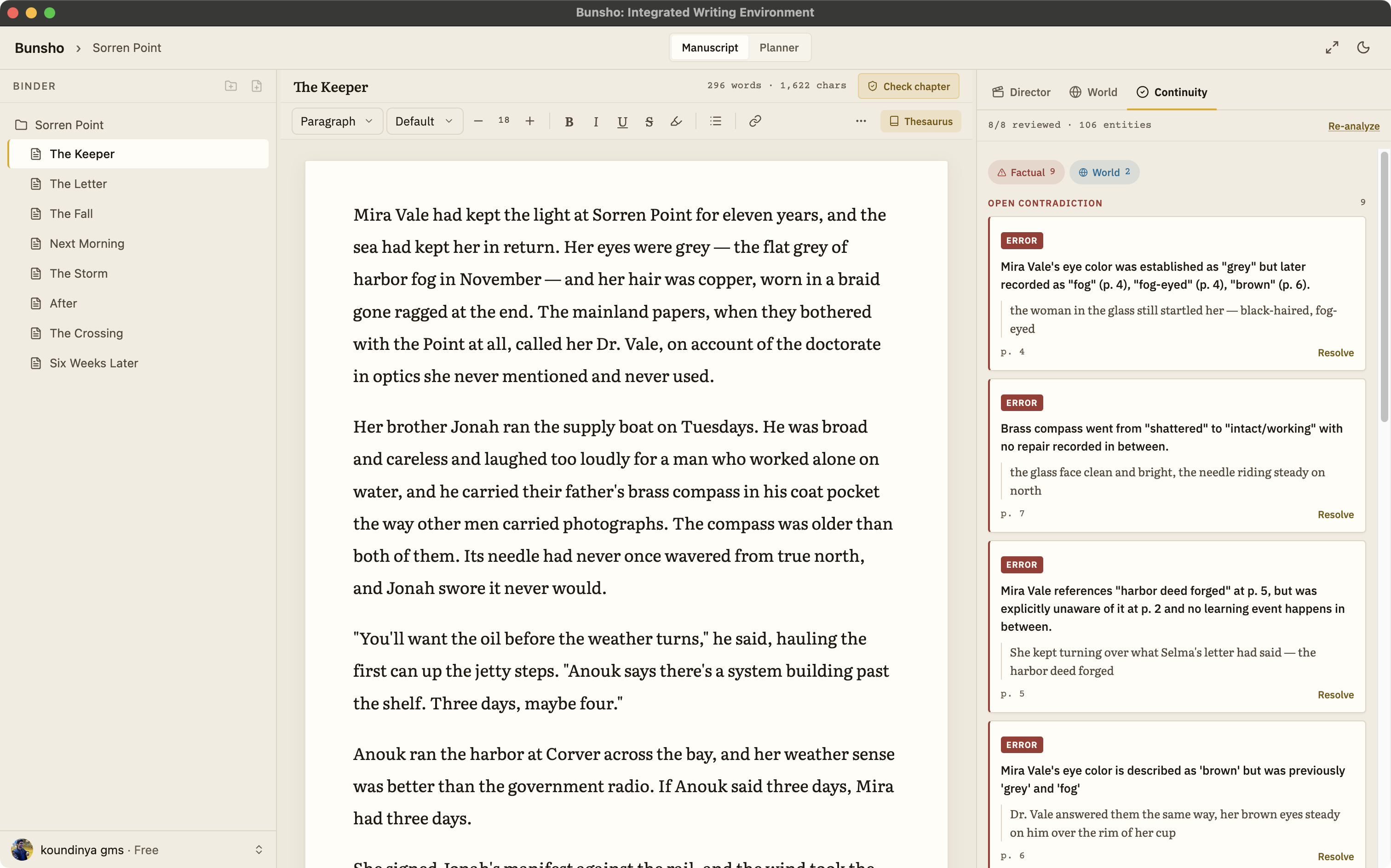
Bunsho remembers what your story has established and checks your chapters against it when you ask. Check one chapter before you move on, review only what changed since your last pass, or review the whole manuscript, and every finding arrives with both passages in view.
Why you cannot proofread for this
Continuity errors are not typos. A typo is wrong on the page it sits on. A continuity error is two correct pages that disagree, usually a hundred pages apart, written weeks apart, each one fine on its own. You read chapter three in January and chapter nineteen in March and never hold both in your head at once. Your first reader does, and that is who finds it.
Film solved this by staffing a person whose only job is to remember. Bunsho gives a novel the same person.
Three ways to run a check
Check this chapter
Finish a chapter, run the check, move on. Bunsho reads the chapter against everything the manuscript has established so far and lists what disagrees. The cost is shown before you confirm.
Review changes
After a revision pass, check only the chapters whose text has changed since they were last checked. Bunsho tells you how many chapters that is and what it will cost before it starts, so a small edit never triggers a full re-read.
Run full review
The whole manuscript, front to back. It runs once automatically when you first import a book, with the cost shown and the option to skip, and afterwards whenever you ask for it.
Nothing runs while you type
There is no background checking and no meter on your writing. The continuity checker reads when you press the button and at no other time.
How a finding reads
A finding is never “this feels off.” It is a specific disagreement with both sides quoted. Open one and you see the sentence that established a fact, the sentence that contradicts it, and the chapter each came from:
Chapter 4: “She had never seen the letter, and Selma meant to keep it that way.” Chapter 2: “Mira folded the letter back into its envelope and said nothing.” Mira acts on the letter two chapters before she learns it exists.
From there the decision is yours. Fix one passage, fix the other, or dismiss the finding because it is a flashback, a lie, or a character who is honestly mistaken. Findings about the same fact are grouped, so a detail that drifted across six chapters reads as one problem with six citations rather than six separate alarms.
What it reads, and where the facts come from
The checker reads against the World tab: the characters, places, objects, relationships, and rules your manuscript has established, each tied to its source sentence, plus anything you have entered there by hand. Hand entries are canon. Set a character's eye colour in the World tab and a chapter that says otherwise is flagged, whichever was written first.
It is the same memory that holds Director Mode to your canon when it drafts a scene. And it is what separates a dedicated checker from pasting chapters into ChatGPT, which can only guess at a contradiction and cannot show you where either side of it came from. For the broader case, including what a plot hole is and which ones readers actually notice, see the plot hole checker.
Common questions
What kinds of continuity errors does it catch?
Contradictions your manuscript makes against itself: a character's age or eye colour drifting between chapters, someone acting on information she has not yet been given, an injury that heals off the page, an object that turns up somewhere it was never taken, a journey that takes three days once and a week later, and a rule of your world that holds in one scene and not the next.
Does it check while I type?
No. Checking is deliberate. You run a check when you want one, on a chapter, on everything that changed since your last review, or on the whole manuscript. Your typing is never watched and never metered.
How does it avoid false alarms?
Bunsho only flags what it can show you. Every finding cites the two passages that disagree, so you can judge it in seconds. A flashback, a lie, or a character who is simply wrong about something is yours to dismiss.
What does a check cost?
The editor is free and checking needs a free sign-in, which comes with 10,000 starter credits. The cost of a check is shown before you run it. Storyteller ($15 a month) and Saga ($29 a month) include a monthly allowance for regular checking.
Is my manuscript uploaded?
Your manuscript lives on your machine, not on our servers. Pages are sent for analysis only when you run a check, and they're never stored or used for training.
Check before you move on.
Bunsho is free to download for macOS and Windows. Sign in free when you want your first check, with 10,000 starter credits included.